mirror of
https://github.com/Mr-xn/Penetration_Testing_POC.git
synced 2026-10-24 17:04:31 +00:00
 CopilotandMr-xn
2b0f5a5e19
CopilotandMr-xn
2b0f5a5e19
* Move IoT docs into root iot directory

Co-authored-by: Mr-xn <[email protected]>

* Append missing IoT README entries

Co-authored-by: Mr-xn <[email protected]>

---------

Co-authored-by: copilot-swe-agent[bot] <[email protected]>
Co-authored-by: Mr-xn <[email protected]>
318 lines
15 KiB
Markdown
318 lines
15 KiB
Markdown
# 打印机之Internet Printing Protocol(IPP)协议分析
|
||
> stone
|
||
> 来源:https://www.iotsec-zone.com/article/24
|
||
|
||
打印机之Internet Printing Protocol(IPP)协议分析
|
||
|
||
## 概述
|
||
|
||
> **网络打印协议**(**IPP**)是一种专门的应用层协议,用于客户端设备(计算机,移动电话,平板电脑等)和打印机(或之间的通信[的打印服务器](https://en.wikipedia.org/wiki/Print_server))。它允许客户端向打印机或打印服务器提交一个或多个[打印作业](https://en.wikipedia.org/wiki/Print_job),并执行诸如查询[打印机](https://en.wikipedia.org/wiki/Printer_(computing))状态、获取打印作业状态或取消单个打印作业等任务,目前98% 以上的打印机都支持IPP。
|
||
>
|
||
> **from wiki Internet_Printing_Protocol**
|
||
|
||
在研究打印机漏洞过程中,发现目前绝大部分的打印机都支持IPP协议,且绝大部分的打印机针对该协议未设置授权访问,这意味着任何人都可以通过IPP协议匿名连接到这些设备(打印机)。攻击者可以滥用这些设备以用于信息披露,包括潜在访问和操纵打印作业。远程代码执行漏洞也已在过去的各种打印机模型上被发现,并且可能会被利用。本文主旨在通过分析IPP协议,让读者对IPP协议有一个更清楚的认识。
|
||
|
||
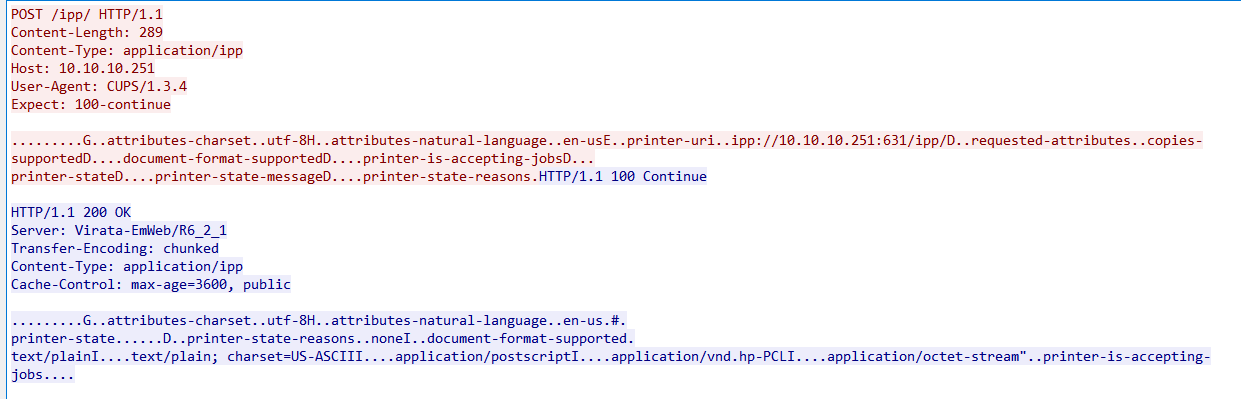
IPP 是使用[超文本传输协议](https://en.wikipedia.org/wiki/Hypertext_Transfer_Protocol)(HTTP) 实现的,并继承了所有 HTTP 流的安全功能,IPP 使用传统的C-S模型,客户端在 HTTP POST 请求中向 IPP 打印机发送带有[MIME](https://en.wikipedia.org/wiki/MIME)媒体类型“application/ipp”的IPP 请求消息。IPP 请求消息由使用**自定义的二进制编码的键值对**组成,后跟“end-of-attributes-tag”属性结束标签和请求所需的任何文档数据(例如要打印的文档)。IPP 响应在 HTTP POST 响应中发送回客户端,再次使用“application/ipp”MIME 媒体类型,如图1所示。
|
||
|
||
|
||
|
||
图1 基于HTTP协议的IPP协议
|
||
|
||
IPP主要有IPP/1.1,IPP/2.0, IPP/2.1, IPP/2.2四个版本。其中1.1版本主要关注用户功能的实现,其他三个版本单独定义了许多新的操作。
|
||
|
||
本文目录结构组织如下:
|
||
|
||
1. IPP简易模型
|
||
2. 相关专业术语解释
|
||
3. IPP协议中的核心操作-同步
|
||
4. IPP 传输过程中数据的编码
|
||
5. 公网上的暴漏情况
|
||
6. 检测工具
|
||
|
||
## IPP简易模型
|
||
|
||
|
||
|
||
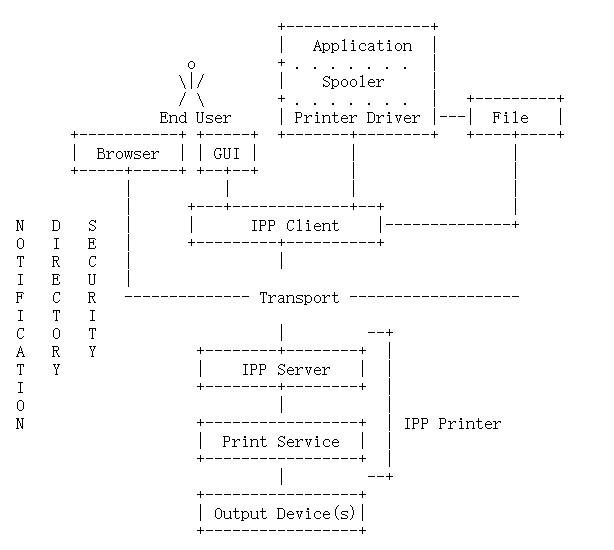
图2 IPP模型
|
||
|
||
术语解释:
|
||
|
||
End User: 终端用户
|
||
|
||
IPP Client: IPP客户端,实现了IPP的客户端协议,终端用户通过使用IPP客户端去查询打印机以及管理打印任务。
|
||
|
||
IPP Server:实现了服务端打印机对象的协议。
|
||
|
||
Print Service: 具体的执行打印任务的服务
|
||
|
||
Out Device(s): 输出设备
|
||
|
||
该图节选自[RFC8011](https://datatracker.ietf.org/doc/html/rfc8011#section-5.2),从图2可以看出,终端用户通过连接IPP客户端,将要打印的数据传送到IPP服务端,IPP服务端接着将数据交给打印服务,来打印客户提交的打印作业,最后通过输出设备输出。
|
||
|
||
## 相关术语解释
|
||
|
||
### Job
|
||
|
||
一次打印任务被称为一次作业
|
||
|
||
### Attributes
|
||
|
||
属性是一个信息项,它与一个IPP对象(打印机、作业等)的实例相关联。IPP对象(打印机、作业等)的实例相关联的信息。 一个属性由一个属性名称(name)和一个或多个属性值(value)组成。 每个属性都有一个特定的属性语法,主要分为操作属性,打印属性以及作业属性
|
||
|
||
- 操作属性标签
|
||
|
||

|
||
|
||
- 打印属性标签
|
||
|
||

|
||
|
||
- 作业属性标签
|
||
|
||

|
||
|
||
### Attribute Group Name
|
||
|
||
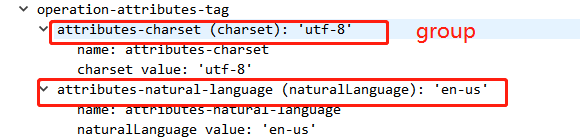
相关的属性被分组为命名的组,组的名称组是一个关键字。 组的名称可以用来代替命名组中的所有属性。
|
||
|
||
|
||
|
||
### Attribute Name
|
||
|
||
属性名是一个关键字,用来描述一个属性代表的含义
|
||
|
||

|
||
|
||
### end-of-attributes-tag
|
||
|
||
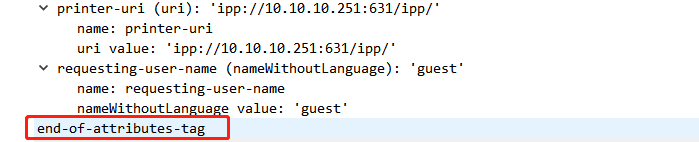
属性结束标签,标记着属性的结束。
|
||
|
||
|
||
|
||
DATA:
|
||
|
||
具体的被打印的数据
|
||
|
||

|
||
|
||
### 操作层
|
||
|
||
因为IPP协议是在http协议之上封装的协议,这里的操作层其实指的就是HTTP请求或响应的消息主体部分(发送post请求的时候的data的值)。IPP传输层协议用的是HTTP,支持HTTP1.1和HTTP1.2。
|
||
|
||
## IPP协议中的核心操作-同步
|
||
|
||
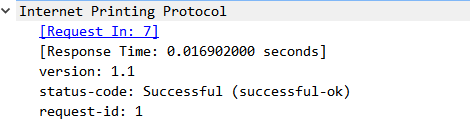
IPP协议中的核心操作**同步**主要通过operation-id和request-id来保证服务器与客户端交互的同步性,如下图所示
|
||
|
||

|
||
|
||

|
||
|
||
|
||
|
||
#### operation-id
|
||
|
||
每个IPP操作请求都包括一个可识别的"operation-id" 值,客户端通过"operation-id"指定每次IPP请求发送什么操作。支持的操作列表以及对应的operation-id如下表所示
|
||
|
||
| operation-id | Operation Name |
|
||
| :-----------: | :-----------------------------: |
|
||
| 0x0000 | reserved, not used |
|
||
| 0x0001 | reserved, not used |
|
||
| 0x0002 | Print-Job |
|
||
| 0x0003 | Print-URI |
|
||
| 0x0004 | Validate-Job |
|
||
| 0x0005 | Create-Job |
|
||
| 0x0006 | Send-Document |
|
||
| 0x0007 | Send-URI |
|
||
| 0x0008 | Cancel-Job |
|
||
| 0x0009 | Get-Job-Attributes |
|
||
| 0x000a | Get-Jobs |
|
||
| 0x000b | Get-Printer-Attributes |
|
||
| 0x000c | Hold-Job |
|
||
| 0x000d | Release-Job |
|
||
| 0x000e | Restart-Job |
|
||
| 0x000f | reserved for a future operation |
|
||
| 0x0010 | Pause-Printer |
|
||
| 0x0011 | Resume-Printer |
|
||
| 0x0012 | Purge-Jobs |
|
||
| 0x4000-0x7fff | reserved for vendor extensions |
|
||
|
||
#### request-id
|
||
|
||
每个IPP操作请求都包括一个可识别的 "request-id"值,每个**操作**(operation-id指定)的调用都是由一个 "request-id "值来识别。 对于每个请求,客户端选择"request-id",它必须是一个唯一的整数(范围为1到2**31-1(包括),这个 "request-id "允许客户管理多个未处理的请求。
|
||
|
||
接收的IPP对象(打印机、作业等)会复制所有的32位的客户提供的 "request-id "属性复制到响应中,以便客户能与之匹配响应,以便客户可以将响应与正确的未处理请求相匹配。 如果请求在收到完整的 "request-id "之前就被终止了,那么IPP对象就会拒绝这个请求并返回一个 "request-id "为0的响应。
|
||
|
||
## IPP 传输过程中数据的编码
|
||
|
||
操作层是HTTP请求或响应的消息主体部分,它必须包含一个IPP操作请求或IPP操作响应。 每个请求或响应是由一连串的值和属性组成的序列。 属性组指的是一个属性的序列,每个属性包含一个名称和值,本章节介绍了传输过程中IPP数据的编码请求和响应消息的编码。
|
||
|
||
### Request and Response
|
||
|
||
```bash
|
||
-----------------------------------------------
|
||
| version-number | 2 bytes - required
|
||
-----------------------------------------------
|
||
| operation-id (request) |
|
||
| or | 2 bytes - required
|
||
| status-code (response) |
|
||
-----------------------------------------------
|
||
| request-id | 4 bytes - required
|
||
-----------------------------------------------
|
||
| attribute-group | n bytes - 0 or more
|
||
-----------------------------------------------
|
||
| end-of-attributes-tag | 1 byte - required
|
||
-----------------------------------------------
|
||
| data | q bytes - optional
|
||
-----------------------------------------------
|
||
```
|
||
|
||
IPP 报文格式
|
||
|
||
每次IPP操作请求都必须包含以下参数(注意顺序):
|
||
|
||
1. "version-number"
|
||
2. "operation-id"
|
||
3. "request-id"
|
||
|
||
每次的IPP操作响应都必须包含以下参数(注意顺序):
|
||
|
||
1. "version-number"
|
||
2. "status-code"
|
||
3. "request-id":对应的请求中的request-id
|
||
|
||
第四个字段是 "attribute-group "字段,它出现0次或更多次。 每个 "attribute-group "字段代表一个单一的属性组,例如文中上面提到的操作属性组或工作属性组,但要注意顺序,是有序的。"end-of-attributes-tag "字段总是存在的,即使"data "字段不存在,"data"字段代表打印的数据。
|
||
|
||
### Attribute Group
|
||
|
||
```bash
|
||
---------------------------------------------------------
|
||
| begin-attribute-group-tag | 1 byte
|
||
----------------------------------------------------------
|
||
| attribute | p bytes |- 0 or more
|
||
----------------------------------------------------------
|
||
```
|
||
|
||
一个 "attribute-group "字段包含零个或多个 "attribute"字段。请注意,"begin-attribute-group-tag "字段的值和"end-of-attributes-tag"字段的值被称为 "分隔符"(delimiter-tags)。
|
||
|
||
### Attribute
|
||
|
||
```bash
|
||
---------------------------------------------------------
|
||
| attribute-with-one-value | q bytes
|
||
----------------------------------------------------------
|
||
| additional-value | r bytes |- 0 or more
|
||
```
|
||
|
||
当一个属性只有一个单一的指(例如,"copies "的值为10和"side-supported "仅具有值"one-sided";代表单面打印10页),则传输的数据根据"attribute-with-one-value"的数据结构来进行编码。当一个属性是有n个值的多值时
|
||
(例如,"sides-supported "有 " one-sided"和 "two-sided-long-edge "两个值),它就被编码为一个 "attribute-with-one-value "字段,后面有n-1个 "additional-value "字段。
|
||
|
||
### Attribute-with-one-value
|
||
|
||
```bash
|
||
-----------------------------------------------
|
||
| value-tag | 1 byte
|
||
-----------------------------------------------
|
||
| name-length (value is u) | 2 bytes
|
||
-----------------------------------------------
|
||
| name | u bytes
|
||
-----------------------------------------------
|
||
| value-length (value is v) | 2 bytes
|
||
-----------------------------------------------
|
||
| value | v bytes
|
||
```
|
||
|
||
一个 "Attribute-with-one-value "字段被编码为五个子字段。
|
||
|
||
1. "value-tag "字段指定了属性的语法,例如,0x44代表 "keyword"。
|
||
2. "name-length "字段指定了 "name "字段的长度,以字节为单位,例如上图中的u或 "side-supported "名称的长度15。
|
||
3. "name "字段包含属性的文本名称,例如"side-supported"。
|
||
4. "value-length "字段指定了 "value "字段的长度,单位为字节,例如,图中的v或者值 "one-sided"的长度是9(上面side-supported对应的值)。
|
||
5. "value "字段包含了属性的值,例如,文本值 "one-sided"。
|
||
|
||
### Additional-value
|
||
|
||
```bash
|
||
-----------------------------------------------
|
||
| value-tag | 1 byte
|
||
-----------------------------------------------
|
||
| name-length (value is 0x0000) | 2 bytes
|
||
-----------------------------------------------
|
||
| value-length (value is w) | 2 bytes
|
||
-----------------------------------------------
|
||
| value | w bytes
|
||
```
|
||
|
||
一个 "附加值 "是由四个子字段编码的。
|
||
|
||
1. "value-tag "字段指定了对应的属性,例如,0x44表示 "keyword"。
|
||
2. "name-length "字段的值为0,表明它是一个 "additional-value"。
|
||
3. "value-length"字段的值,例如上面提到的"two-sided-long-edge"的长度是19
|
||
4. "value":字段表明文本值 "two-sided-long-edge"。
|
||
|
||
### 部分代码实现
|
||
|
||
```python
|
||
DEFAULT_PROTO_VERSION = (2, 0)
|
||
# GET_PRINTER_ATTRIBUTES
|
||
operation= 0x000B
|
||
DEFAULT_CHARSET = "utf-8"
|
||
DEFAULT_CHARSET_LANGUAGE = "en-US"
|
||
# 注意这里需要进行一个ipp或者IPPS 到http 或者https的转化
|
||
# 如果是检测ipp,则scheme是http,如果检测ipps,则scheme是https
|
||
self.printer_url=self.scheme + "://" + host + ":" + port + "/ipp/print"
|
||
def message(self, operation):
|
||
# 数据包的构造必须是有序的
|
||
payload = OrderedDict()
|
||
payload["version"] = DEFAULT_PROTO_VERSION
|
||
payload["operation"] = operation
|
||
payload["request-id"] = random.choice(range(10000, 99999))
|
||
attributes = OrderedDict()
|
||
attributes["attributes-charset"] = DEFAULT_CHARSET
|
||
attributes["attributes-natural-language"] = DEFAULT_CHARSET_LANGUAGE
|
||
attributes["printer-uri"] = self.printer_url
|
||
payload["operation-attributes-tag"] = attributes
|
||
return payload
|
||
```
|
||
|
||
## 公网上的暴漏情况
|
||
|
||
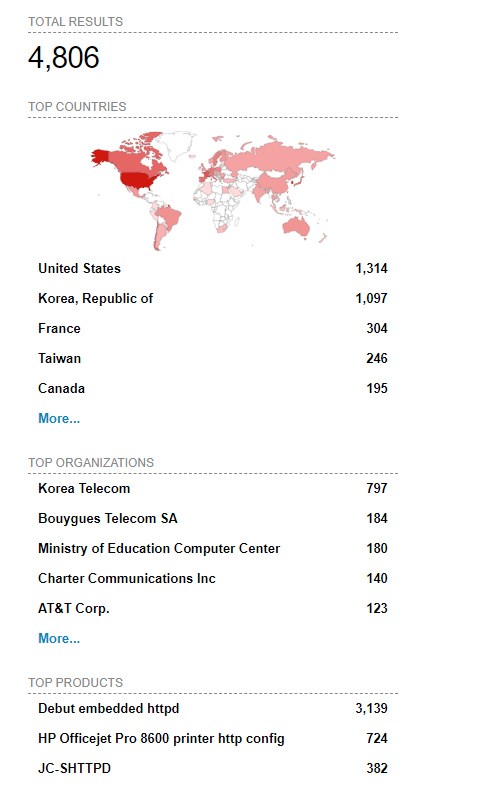
shodan 搜索关键字 device:printer port:"631",可以发现公网上设备还是挺多的
|
||
|
||
|
||
|
||
## 检测工具
|
||
|
||
[https://github.com/ctalkington/python-ipp](https://github.com/ctalkington/python-ipp)
|
||
|
||
### 安装
|
||
|
||
```bash
|
||
pip install pyipp
|
||
```
|
||
|
||
### 用法
|
||
|
||
```python
|
||
import asyncio
|
||
|
||
from pyipp import IPP, Printer
|
||
|
||
async def main():
|
||
"""Show example of connecting to your IPP print server."""
|
||
async with IPP("ipps://EPSON123456.local:631/ipp/print") as ipp:
|
||
printer: Printer = await ipp.printer()
|
||
print(printer)
|
||
|
||
if __name__ == "__main__":
|
||
loop = asyncio.get_event_loop()
|
||
loop.run_until_complete(main())
|
||
```
|
||
|
||
## 参考
|
||
|
||
[https://datatracker.ietf.org/doc/html/rfc2910](https://datatracker.ietf.org/doc/html/rfc2910)
|
||
|
||
[https://datatracker.ietf.org/doc/html/rfc8011](https://datatracker.ietf.org/doc/html/rfc8011)
|
||
|
||
[https://datatracker.ietf.org/doc/html/rfc8010](https://datatracker.ietf.org/doc/html/rfc8010)
|